
A Geek Squad scam email is a phishing message that pretends to come from Best Buy's tech support. It claims a subscription just renewed for hundreds of dollars and pushes you to call a fake number. Don't click, call or reply. Check your real Best Buy account instead, then report the email to abuse@bestbuy.com and ReportFraud.ftc.gov.
Last updated: September 26, 2026
I'll be straight with you.
If a surprise "Geek Squad invoice" just landed in your inbox, your stomach probably dropped. Hundreds of dollars, gone, for something you never bought?
Take a breath. I went through the FTC's official warning, recent news coverage and security research, so you don't have to. By the end, you'll know exactly what to do.
What Is the Geek Squad Scam Email?
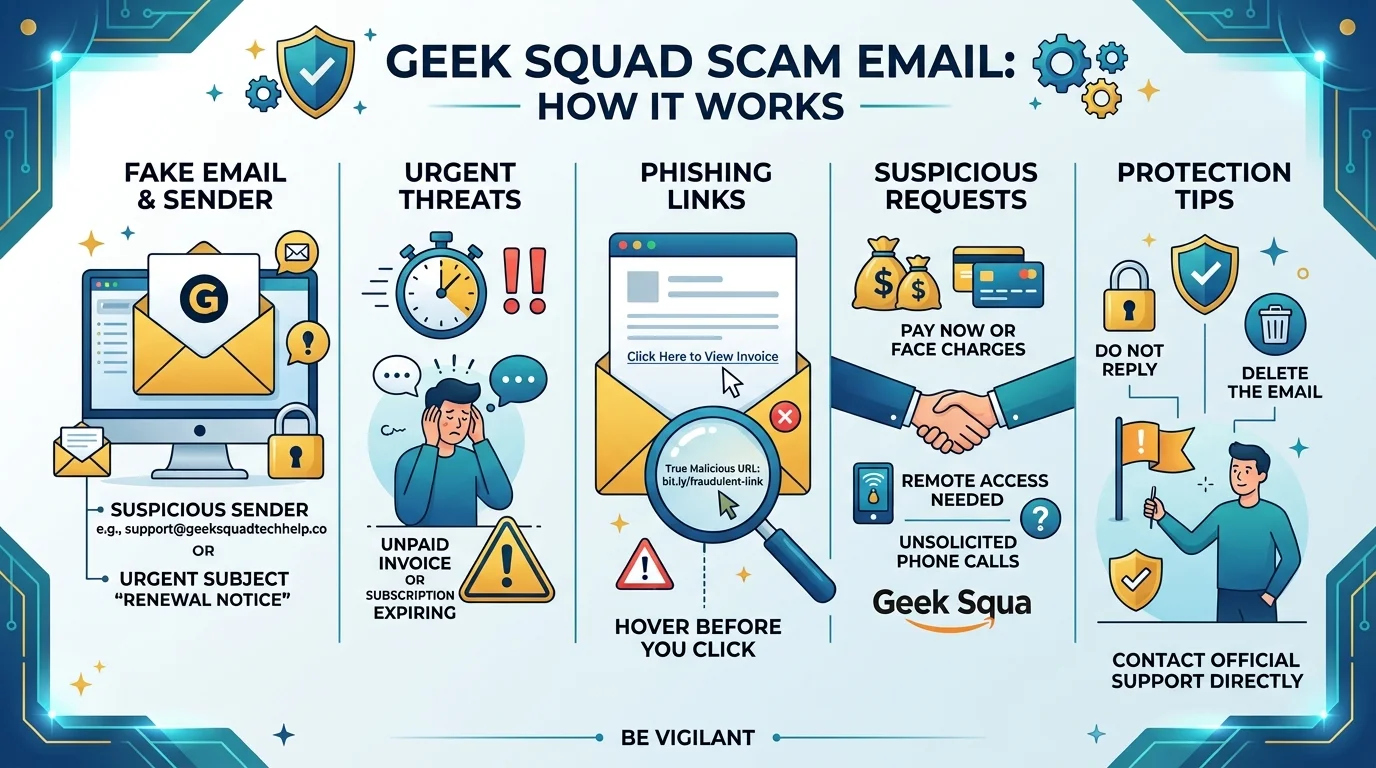
Here's the twist: Geek Squad itself is real. It's Best Buy's in house tech support team, and it isn't the problem. The scam is the impostor borrowing its name. Criminals pick a brand you already trust, then use it to rush you into a bad decision. The email usually claims your auto renewal just went through, shows a fake invoice, and tells you to call a number to cancel. That's a classic phishing scam.
Why "Callback Phishing" Works So Well
Many of these emails contain no bad link at all. They just want you to pick up the phone.
Security folks call this callback phishing. It slips past the warning signs most people know to look for.
By the Numbers: Why This Scam Won't Die
This scam isn't a small nuisance. It has been running for years, and the scale is real. The figures below come from consumer protection reporting, so you can see how often people get hit. Notice how the same brand keeps showing up.
About 52,000 reports of Best Buy and Geek Squad impersonation reached the FTC in 2023, the most for any brand that year.
That beats Amazon (34,000) and PayPal (10,000), per Avast's breakdown.
Fake charges usually run $200 to $500, high enough to scare you but believable enough to trust.
The FTC first warned about this scam in October 2022, and Cybernews notes the fake emails have circled for about a decade.
In May 2026, Fox News covered a fresh version showing a bogus $489.99 charge.
How the Geek Squad Scam Works, Step by Step
Let me walk you through the con from the scammer's side. Once you see the machinery, it loses its grip on you. Every version follows the same three moves, and each one is built to keep you from thinking clearly. Read them once, and you'll spot them fast.
Step 1: The Bait Lands in Your Inbox
You get an email about a renewal you never made. It has logos, an invoice number and a big dollar amount.
Step 2: You Call the Number
The message says to call within 24 hours to dispute the charge. That's the trap. The FTC warns you should never call a number from the message.
Step 3: The "Refund" Trap
The fake agent asks for remote access to your computer so they can "process a refund." Please don't give it.
Once they're in, they can plant spyware and steal your banking logins. Some fake an accidental over refund, then tell you to pay it back with gift cards.
Common Types of Geek Squad Scam Emails
Not every fake message looks the same. Scammers rotate the story, but the goal never changes: money, passwords or access to your device. Here are the versions I found most often in the research, so you can recognize them on sight.
Scam Type | What the Email Says | What They Want |
|---|---|---|
Renewal invoice | "Your membership renewed for $349.99" | You calling a fake number |
Fake antivirus alert | "Your device is infected, download protection" | Malware installed, remote access |
Password reset | "Your Best Buy account was compromised" | Your login credentials |
Prize or gift | "You won a Best Buy gift certificate" | A "fee" or your personal data |
Refund scam | "We overpaid you, send it back" | Gift cards or wire transfers |
Real vs. Fake: Red Flags You Can Check in 10 Seconds
You don't need to be a tech wizard for this. You just need a quick checklist, and the table below is it. Scammers count on you skimming, so slow down and compare the email against each row before you click or dial anything.
What to Check | Real Geek Squad Email | Fake Email |
|---|---|---|
Sender address | Ends in @bestbuy.com or @geeksquad.com | Random Gmail or odd domain |
Greeting | Uses your name | "Dear customer" |
Phone number | Matches Best Buy's official site | Number buried in the invoice |
Tone | Calm, informational | "Call within 24 hours!" |
Details | One company, consistent branding | Mixed brand names, odd wording |
The Fox example mixed Geek Squad, Razorpay and "QuickTax Billing" in one email, even including a stray German word. That's nonsense you can catch.
What to Do If You Got a Fake Geek Squad Email
Okay, the email is sitting in your inbox. Now what?
Good news: the fix is quick, and it takes about five minutes. Follow these steps in order. Don't skip the reporting step, because it helps other people too.
Step 1: Don't Touch Anything
Don't click. Don't reply. Don't call.
If you're curious about your account, open the Best Buy site by typing the address yourself. Then check your charges there, or confirm with your bank directly.
Step 2: Report It
Do all three:
Use your email provider's report phishing button.
Forward the email to abuse@bestbuy.com, as NordVPN's guide advises.
File a report at ReportFraud.ftc.gov.
You can also forward it to reportphishing@apwg.org, which Surfshark suggests for helping researchers track campaigns. Then delete it.
Step 3: Already Clicked or Called? Act Fast
Don't panic. Do this right now:
Call your bank and ask them to reverse any unauthorized charge.
Change your passwords, starting with email and banking. If you're locked out of your inbox, our guide on how to recover a Gmail password without a phone number walks you through it.
Run a full security scan. If it happened on your phone, follow our steps to remove malware from Android.
Read the FTC's advice on what to do if you were scammed.
Speed matters. The sooner you move, the more you can recover.
How to Protect Yourself for Good
Here's my honest take.
Reporting one email won't stop the next fifty. These scams arrive in waves, and your address is probably on a list already. So the smart move is to build a safety net before the next message arrives, not after.
I'd cover three bases:
Antivirus software with phishing protection, which catches malware and bad links you might miss.
A password manager, so one stolen login never opens every account.
Identity theft protection, which alerts you when your personal data shows up where it shouldn't.
Add two factor authentication on your email and bank, and you've become a hard target.
Think about the math. A reputable security suite costs a small fraction of one fake $489 "renewal" that actually goes through.
You wouldn't leave your front door unlocked. So why leave your inbox open?
Pick a trusted security suite today, switch on the phishing protection, and finish the setup in one sitting. Future you will be glad you did.
Geek Squad Scam Email: Frequently Asked Questions
These are the questions people ask most. Each answer is short on purpose, so you can grab what you need and move on.
Is the Geek Squad email real or a scam?
If it shows a surprise renewal charge and asks you to call a number, it's almost certainly a scam. Geek Squad is legitimate, but the email is an impersonation.
What should I do if I called the number?
Contact your bank right away, change your passwords, and scan your device. If you gave anyone remote access, disconnect it and run a full malware scan.
Where do I report a Geek Squad scam email?
Forward it to abuse@bestbuy.com, report it to the FTC at ReportFraud.ftc.gov, and use your email provider's phishing button. Avast lists additional options, including local police if you lost money.
Can opening the email infect my device?
Opening the email alone is low risk, but clicking links or opening attachments can be dangerous. If you did, update your security software and run a scan, as the FTC advises.
Why did I get this if I've never used Geek Squad?
Scammers send mass emails to huge lists gathered from data breaches and scraping. It isn't personal, and you were simply on the list.
Final Thoughts
Let's wrap this up.
The Geek Squad scam email works because it rattles you. Now that you know the playbook, you can calmly delete it.
Remember the golden rule: never call a number from an email. Check with the company yourself, using contact details you found on your own.
Share this with one person who might fall for it, like a parent or grandparent. It could save them thousands.
Stay sharp, and stay skeptical.