
To fix sticky keyboard keys, unplug the keyboard, blow out debris with compressed air, then wipe the keys with a microfiber cloth dampened with isopropyl alcohol. If that fails, remove the keycaps and clean underneath. If your keys act "stuck" but look clean, the cause is probably the Sticky Keys accessibility feature, which you can turn off in Settings in about a minute.
Your keys feel glued down. Or maybe Shift keeps throwing up a weird pop up. I've been there, and it's maddening. The good news is that nearly every case comes down to one of two causes, and both are fixable in under 30 minutes. Let me show you exactly how.
Which Type of Sticky Keys Do You Have?
Before you touch anything, diagnose the problem. Mixing up the two causes wastes your whole afternoon, so spend 30 seconds here. One cause is physical gunk. The other is a software setting.
What you notice | Likely cause | Go to |
|---|---|---|
Keys feel tacky, slow, or don't spring back | Spilled liquid, dried soda, dust and debris | Physical fixes |
Shift, Ctrl, or Alt seem "held down" and shortcuts act strangely | Sticky Keys accessibility feature | Software fixes |
A pop up appears after pressing Shift five times | Sticky Keys shortcut triggered | Software fixes |
Key is dead after a big spill | Liquid damage | Replace or repair |
How to Fix Physically Sticky Keyboard Keys
Start small and escalate only when you need to. That approach protects your keyboard switches and saves fragile plastic clips. KTAR's Data Doctors notes that buildup of dust, dirt, and debris over time is the most common cause.
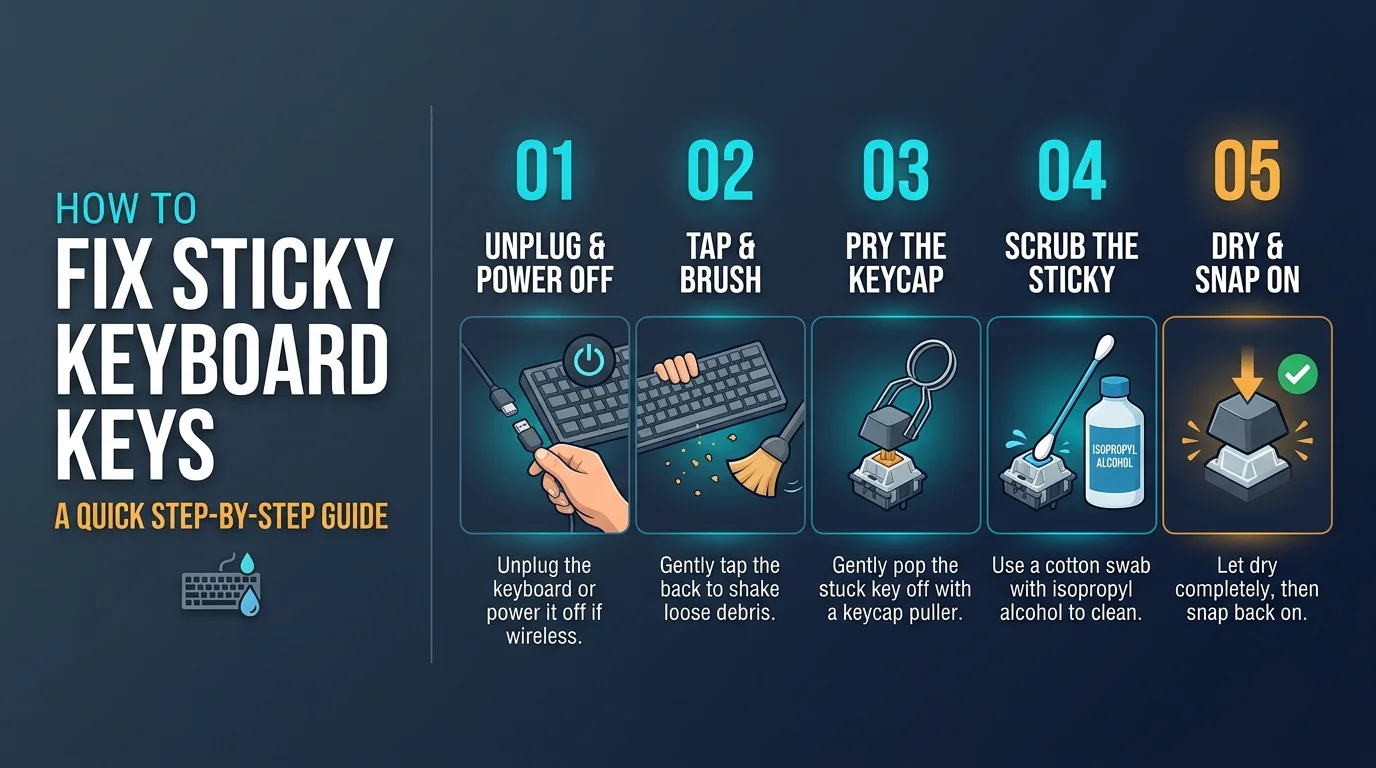
Step 1: Try the Quick Clean
Most sticky keys don't need surgery. A light wipe often works because the stickiness is only surface residue from sugary drinks or greasy fingers. It takes five minutes and costs almost nothing. For a full routine you can repeat monthly, see our guide on how to clean a keyboard.
Unplug the keyboard or shut down your laptop.
Blast around the keys with compressed air.
Dampen a microfiber cloth with isopropyl alcohol.
Wipe the keycaps and the gaps between them.
Use a cotton swab around the stubborn keys.
Press each key about ten times to test it.
SlashGear's guide follows a similar sequence. Dry everything with a clean cloth afterward.
Step 2: Go for the Deep Clean
Still sticky? Time to pull the keycaps. It's easier than it sounds, as long as you go slowly. Sony's support article advises removing and replacing keys one at a time so nothing lands in the wrong spot. If you want more detail on handling individual caps, we cover it in how to clean keyboard keys.
Photograph your layout first.
Lift the keycaps with a keycap puller.
Brush out crumbs with a soft brush or toothpick.
Swab the exposed plate and plungers with alcohol.
Let everything air dry completely.
Snap the keycaps back on.
One warning: skip silicone spray. KTAR notes it leaves residue that attracts more dust.
Mechanical vs. Membrane Keyboards
Your keyboard type changes the risk level. Here's how the two compare, based on Hardware Secrets' breakdown:
Keyboard type | Cleaning difficulty | Best tool | Common risk |
|---|---|---|---|
Mechanical | Easy | Keycap puller | Static discharge |
Membrane | Moderate | Compressed air | Tearing the rubber dome |
For a big sugary spill on a mechanical board, Das Keyboard describes soaking stuck switches in alcohol while pressing them repeatedly.
How to Clean a Sticky MacBook Keyboard
MacBooks play by different rules. The thin butterfly mechanism breaks easily, so prying keys off is a bad idea. Apple's official guide applies to MacBooks from 2015 onward and MacBook Pros from 2016 onward.
Hold your Mac at a 75 degree angle.
Spray compressed air across the keys in a left to right motion.
Rotate the laptop and repeat.
iFixit agrees that you shouldn't try removing keys on butterfly keyboards. For stubborn spots, TechRadar adds that Apple permits a gentle wipe with isopropyl alcohol. Had a liquid spill? Go to a repair shop instead of improvising.
How to Turn Off the Sticky Keys Accessibility Feature
If your keys are clean but behave oddly, you're dealing with an accessibility feature working as designed. Wikipedia explains that it helps people with physical disabilities press modifier keys one at a time. It was first introduced to Mac OS in System 6. The catch is accidental activation.
Windows 11
Turn off the feature and its shortcut, otherwise it ambushes you again next week. Per Zapier's guide:
Open Settings.
Click Accessibility, then Keyboard.
Switch Sticky Keys to Off.
Open the Sticky Keys menu and disable the keyboard shortcut.
Windows 10 users face the same steps under Ease of Access. Note that Windows 10 reached end of support on October 14, 2025, so updating is worth considering.
Mac
Per Apple's accessibility page, go to System Settings, then Accessibility, then Keyboard, and toggle Sticky Keys off. Macworld's explainer covers how it behaves.
When to Stop Cleaning and Replace the Keyboard
Sometimes a keyboard is simply beyond saving. If cleaning doesn't help, you likely have liquid damage, a short circuit, or a worn rubber dome. That's your signal to stop.
Several keys fail after a major spill.
Keys register random characters.
You've cleaned twice and nothing changed.
Sony warns that stickiness caused by spills or foreign matter isn't covered for replacement under warranty.
Prevent Sticky Keys With a Keyboard Cleaning Kit
Cleaning once is fine. Cleaning monthly is what stops sticky keys from coming back. Hardware Secrets recommends weekly air dusting and a monthly surface wipe down.
A good keyboard cleaning kit includes:
A keycap puller
A soft cleaning brush
Microfiber cloths
Cotton swabs
Compressed air
Pair it with isopropyl alcohol of 90 percent or higher. A kit costs a few dollars, while a replacement keyboard or repair costs far more. Buy one today and your future self will thank you.
Frequently Asked Questions
How do I fix sticky keyboard keys without removing them?
Use compressed air, then wipe around the edges with a cotton swab lightly dampened with isopropyl alcohol. Hardware Secrets says this solves minor stickiness caused by oils.
What is the best cleaner for sticky keyboard keys?
Isopropyl alcohol is the most widely recommended choice because it evaporates quickly and dissolves sticky residue. HP's support community suggests the same for soda spills.
How do I clean a sticky MacBook keyboard?
Follow Apple's steps: hold the Mac at 75 degrees and spray compressed air from left to right.
Why does pressing Shift five times cause a pop up?
That's the shortcut for the Sticky Keys accessibility feature. Asurion explains that you can click No to decline it.
How do I permanently disable Sticky Keys on Windows?
Turn the feature off, then disable its keyboard shortcut under Settings, Accessibility, Keyboard, Sticky Keys.
Can I use silicone spray on sticky keys?
No. It leaves a residue that attracts dust and can make things worse.
Final Thoughts
To fix sticky keyboard keys, first work out whether the cause is physical or a software setting. Then wipe, deep clean, or toggle the setting off, and prevent a repeat with a monthly routine and a good cleaning kit. Now go fix that keyboard.