

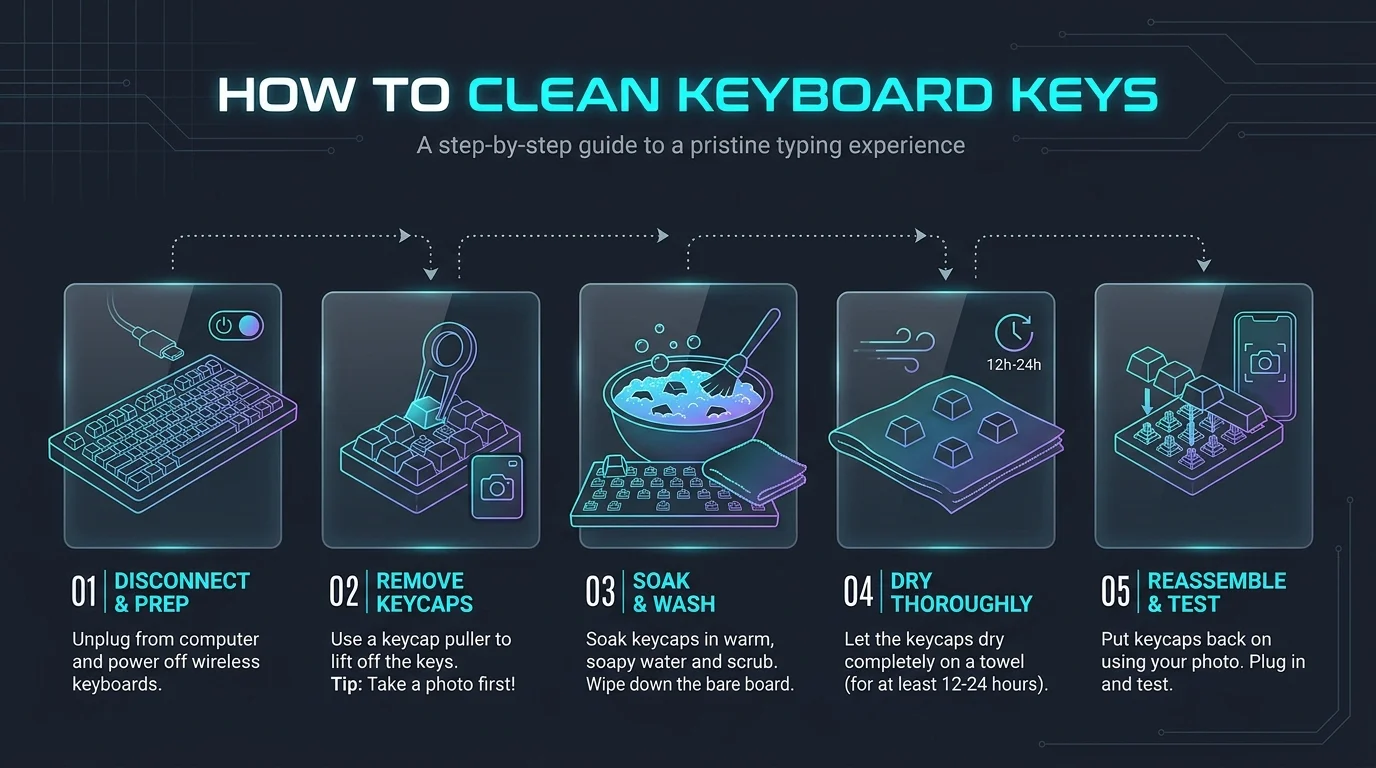
How to Clean Keyboard Keys: To clean keyboard keys, power the keyboard off, blow out loose debris with compressed air, then wipe the keys with a damp microfiber cloth. Use isopropyl alcohol (70% to disinfect) and cotton swabs for the gaps. On a mechanical keyboard, remove the keycaps with a puller and wash them in lukewarm soapy water. Always check your manufacturer's instructions first.
Be honest. When did you last clean your keyboard?
Yeah, I thought so.
I'll show you how to clean keyboard keys in about 15 minutes, without breaking a single clip. The steps come from Apple, iFixit and Wooting. You're not relying on my say so.
Want the big picture first? Read our full guide on how to clean a keyboard. This post zooms in on the keys themselves.
Why Dirty Keys Matter More Than You Think
Sticky keycaps look gross, sure. But the real trouble sits underneath. Dust and debris, crumbs and skin oil work their way under each key. Over time they cause sticky keys, mushy presses and unresponsive keys. There's a hygiene angle too, because a keyboard is a high touch surface.
A 2008 Which? Computing test is a good example, though it's dated. A microbiologist swabbed 33 office keyboards. One carried 150 times the acceptable bacteria limit and was five times dirtier than a toilet seat. The same study found that eating at your desk was the main cause. The test was small, so don't treat it as a universal figure. It does show why regular cleaning helps.
Dust isn't just a keyboard problem, either. The same buildup can clog vents, which is one reason laptops overheat and how to fix it.
Which Cleaning Method Should You Use?
Not every keyboard handles the same treatment, and picking the wrong method is how keys get damaged. This table sums up what the sources recommend for each type. Find your keyboard, then jump to the matching steps below. If your manufacturer says otherwise, follow the manufacturer.
Keyboard type | Best method | Avoid | Source |
|---|---|---|---|
Modern MacBook (butterfly) | Compressed air, short bursts, tilted about 75° | Removing keys | Apple, iFixit |
Other laptops | Compressed air or brush, then damp microfiber with alcohol | Dripping wet cloths | iFixit |
Mechanical keyboard | Keycap puller, lukewarm soapy water, air dry | Hot water, dishwashers | Wooting, Which? |
Shared or office keyboard | 70% isopropyl alcohol on a moist cloth | Spraying directly |
Gather Your Keyboard Cleaning Supplies
Before you touch a single key, grab the right gear. The wrong tool snaps tiny keycap clips or wipes the letters right off. Nothing fancy is needed, and most of it is probably in your house already.
Tool | What it does | Tip |
|---|---|---|
Compressed air | Blows out loose debris | Hold the can upright |
Microfiber cloth | Wipes keys without scratching | Skip paper towels (HP) |
Cotton swabs | Reach the gaps between keys | Keep them lightly damp |
Isopropyl alcohol | Cuts grease and disinfects | 70% for disinfecting, 90%+ in iFixit's guide |
Keycap puller | Removes mechanical keycaps | Pull straight up |
Soft brush | Sweeps dust from switches | Avoid stabilizer gaps |
A keyboard cleaning kit bundles all of this in one box. More on that at the end.
How to Clean Keyboard Keys Step by Step
Here's the part you came for. The method shifts a little depending on what you type on, so I've split it in two. The golden rule stays the same: dry clean first, damp clean second, and never soak the electronics. Power down and unplug before anything else. Rushing is how keys get broken.
How to Clean a Laptop Keyboard
Laptop keys are thin, and their clips are tiny, so go gentle. For recent MacBooks, Apple's guide uses compressed air rather than key removal. This routine fits most laptop keyboards, but check your manual first.
Shut down your laptop and unplug it.
Tilt it to about 75 degrees and spray short bursts left to right, as Apple suggests.
Wipe away the loosened dust with a microfiber cloth.
Dampen a cloth with isopropyl alcohol (damp, never dripping) and wipe the keys and gaps.
Let everything dry before you power on.
Two warnings. iFixit says don't pull keys off butterfly style MacBooks, meaning 2015+ MacBook and 2016+ MacBook Pro. And Which? advises against compressed air on laptops because it can push dust toward the fans. Apple and Which? disagree here, so use short bursts or a brush, and follow your own maker's guidance.
How to Clean Keys Without Removing Them
Not ready to pop anything off? Totally fair. You can get a surprisingly good result with the keys left in place.
Turn the keyboard upside down and tap it gently to shake out crumbs.
Sweep between the keys with a soft brush or narrow crevice tool.
Wipe the tops with a damp microfiber cloth.
Run an alcohol dampened cotton swab along the gaps.
How to Clean a Mechanical Keyboard
This is the fun one. A mechanical keyboard lets you pull the caps and really get in there. Before you start, do what Corsair recommends and photograph your layout. You will forget where the keys go.
Unplug the board and take the photo.
Pull each cap straight up with the keycap puller.
Wash the keycaps in lukewarm soapy water. Wooting warns that hot water can harm them.
Dry them upside down on a towel. Wooting cites about two hours, but wait until they're completely dry.
Brush the board and swab between the switches with a little alcohol.
Press the caps back on and test every key.
Skip the dishwasher. Which? says that can strip the lettering or break keys.
How to Fix Sticky Keys
Sticky keys usually mean dried drink or food residue. On a laptop without butterfly keys, iFixit suggests this fix:
Gently pry the key up with a plastic opening pick.
Blow out debris around the key retainer with compressed air.
Wipe grime with an alcohol dampened swab.
If the retainer itself is sticky, soak it in hot soapy water for 5 minutes. Dry it fully, then reinstall it in the same orientation.
How to Disinfect Keyboard Keys Safely
Cleaning removes dirt. Disinfecting kills germs. They're different jobs, and you want both if the keyboard is shared or someone's been ill. The CDC's guidance says to follow manufacturer instructions first. If there are none, use alcohol based wipes or sprays with at least 70% alcohol, then dry the surface thoroughly. HP suggests a 70% isopropyl alcohol and 30% water mix on a moist microfiber cloth.
Dampen the cloth. Don't spray the keyboard directly.
Wipe every key and the sides of each cap.
Let it air dry before you plug back in.
Common Mistakes That Wreck Keyboards
I've made most of these myself. Learn from my pain.
Using hot water on keycaps
Spraying liquid straight onto the board
Forcing keys off fragile laptop mechanisms
Tilting the air can, which can spit liquid propellant
Reassembling damp parts, which invites corrosion
How Often Should You Clean Your Keyboard?
Short answer: more than you do now. Wooting suggests a monthly clean, and more often if you eat at your desk. I'd add a 60 second weekly wipe down. A tidy routine beats a heroic once a year scrub, and it stops grime from baking into the plastic.
Frequently Asked Questions
How do you clean keyboard keys without removing them?
Shake out loose debris, blow short bursts of compressed air, then wipe with a damp microfiber cloth. Use an alcohol dampened cotton swab for the gaps.
Can you use rubbing alcohol on keyboard keys?
Yes, in moderation. Apply it to a cloth or swab, not directly to the keys. Use 70% to disinfect, and keep the cloth damp, not dripping.
Can you wash keycaps with water?
On mechanical keyboards, yes. Use lukewarm soapy water, never hot, and dry them completely. Don't use a dishwasher.
How often should you clean your keyboard?
Monthly is a good baseline, and more often if you eat at your desk.
Is compressed air safe for laptop keyboards?
Apple uses it for MacBook keyboards. Which? cautions that it can push dust inside laptops. Use short bursts and follow your maker's guidance.
Ready to Make Keyboard Cleaning Effortless?
You've seen the steps. The hardest part is having everything in one place. That's why I'd grab a proper keyboard cleaning kit: a keycap puller, soft brush, microfiber cloth and cleaning gel in one box. No hunting through drawers. No improvising with a butter knife (please, don't).
It costs less than a decent lunch. It protects a keyboard that costs far more. And it turns a dreaded chore into a ten minute reset.
Typing is your job? Pair a clean board with the best laptop for writers, and your hands will thank you twice.
So go order one today. Your keys, your fingers and your future self will thank you.