Quick answer: To start a podcast on Spotify, you either host your show directly and free through Spotify for Creators, or you host it with an outside platform and submit your RSS feed to Spotify. Either way, you'll need an MP3 file (96–320 kbps), square cover art, and at least one published episode before your show goes live — the whole setup takes about 30 minutes.
Now let's get into the details, because "30 minutes" only tells you the mechanics. The strategy behind it is what actually gets you listeners.
Here's the truth: Spotify now reaches around 626 million active users worldwide, and there are already over 4.25 million podcasts fighting for attention. Sounds scary, right? It's not. Most of those shows are abandoned after three episodes. If you actually finish this guide and publish, you're already ahead of 80% of people who "want to start a podcast someday."
Let's get into it.
Why Spotify Is Worth Your Time in the First Place
Quick gut-check before we touch any buttons. Is Spotify even the right platform for you? I think so, and here's why.
Podcast listening isn't a fringe activity anymore. Almost 504.9 million people listen to podcasts worldwide — that's a real audience, not a niche hobby crowd. And Spotify isn't just "one option among many" either. It's become the dominant player in how people discover and consume audio content.
You don't need a huge audience to make this worth it. You need an audience — even 200 loyal listeners beats 20,000 people who forgot your show exists.
(Related: once you're recording regularly, you'll also want a fast way to turn episodes into show notes and blog content — check out my best AI transcription tool for podcasters.)
Two Paths to Getting Your Show on Spotify (Pick One Correctly)
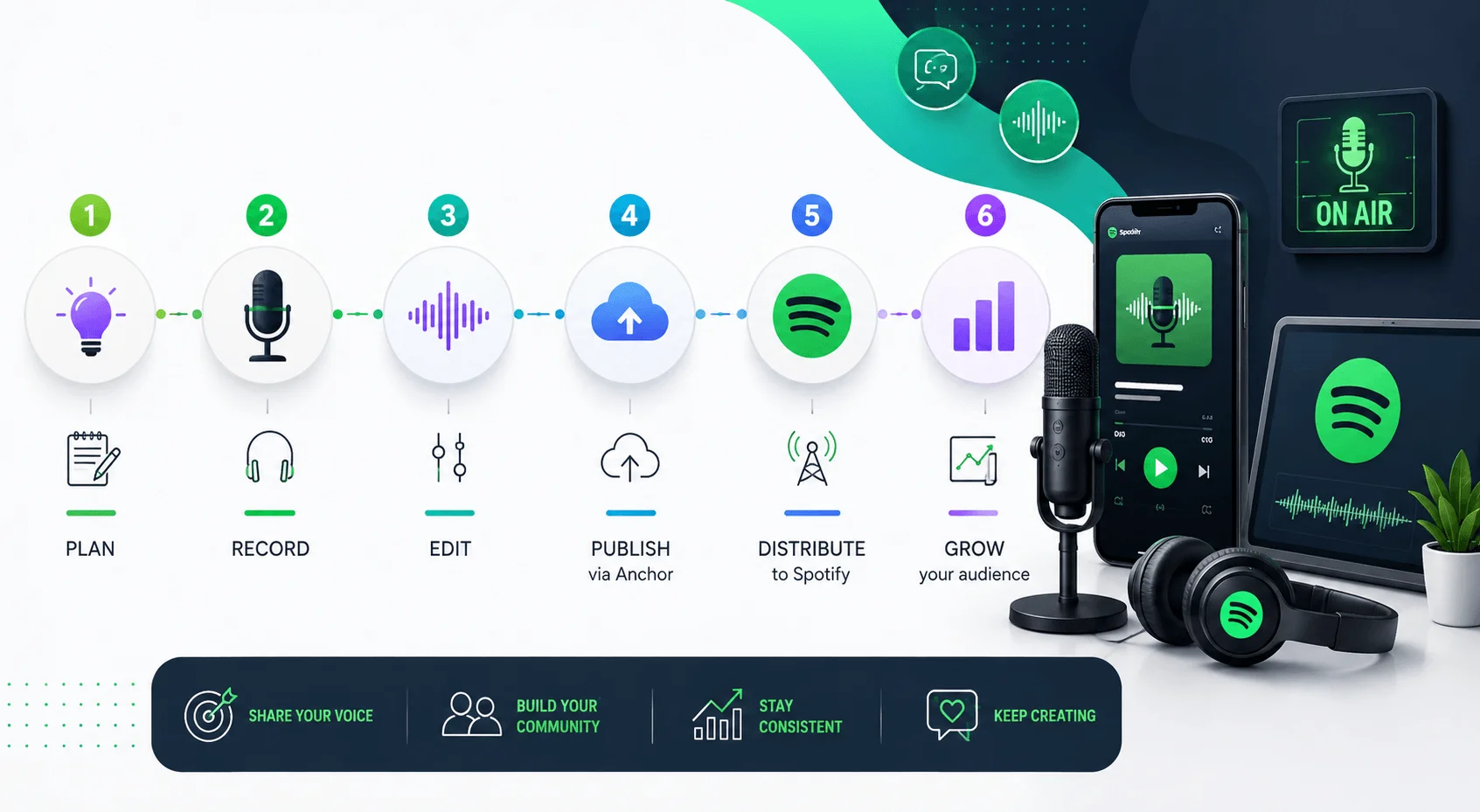
This is where most beginners mess up, so pay attention here.
There are genuinely two different routes to getting your podcast live on Spotify, and picking the wrong one for your goals can bite you later. According to Castos' 2026 breakdown, you can either let Spotify host your show for free through Spotify for Creators, or host it elsewhere and submit your RSS feed — and if you ever want your show available anywhere other than Spotify, hosting elsewhere and submitting the feed is the smarter long-term move.
Let me translate that into something you can actually decide on.
Spotify for Creators vs. External Hosting + RSS Feed
Factor | Spotify for Creators (Direct Host) | External Host + RSS Feed |
|---|---|---|
Cost | Free | Free to paid, depending on host |
Setup time | ~10 minutes | ~20–30 minutes |
Control over your files | Spotify owns distribution | You own your feed and audio |
Multi-platform reach | Spotify only (by default) | Apple Podcasts, Amazon Music, and 40+ platforms |
Best for | Hobby shows, quick testing | Anyone serious about growing long-term |
Switching later | Difficult | Easy — your feed travels with you |
If this is a hobby show you're doing for fun, Spotify for Creators is totally fine. But if you have even a small ambition to grow this into something real — sponsorships, a real audience, maybe even a business — go with the external host route from day one. Switching later is a pain.
Option A: Hosting Directly With Spotify for Creators
This is the fastest path, hands-down. Here's the actual step-by-step process, based on Buzzsprout's current walkthrough:
Head over to Spotify for Podcasters and hit "Get Started."
Log in with your existing Spotify account, or create a new one if you don't have one.
Choose whether you want to start a brand-new podcast or bring over one you already have.
Fill in your basic details — show name, description, and category — because Spotify's algorithm uses this info to categorize your show correctly for search and discovery.
Upload your first audio file. If you haven't recorded anything yet, tools like GarageBand or Audacity work great for audio-only shows, and Adobe Podcast or Descript Rooms are solid for video.
That's genuinely it. No coding. No technical headaches. Just fill in the blanks and hit publish.
Option B: Hosting Elsewhere, Then Submitting Your RSS Feed
If you went with Option B (and I'd nudge most serious creators this way), your process looks a little different.
You'll pick a podcast hosting platform first — think Buzzsprout, Podbean, or RSS.com — upload your episode there, and that platform spits out something called an RSS feed. Think of your RSS feed as your podcast's home address on the internet. Every app — Spotify, Apple Podcasts, whoever — checks that address for updates.
Once you've got that feed URL, here's what happens next according to RSS.com's 2026 guide:
Log into Spotify for Creators, or create an account if this is your first time.
Submit your feed URL where prompted.
Wait for Spotify to verify and pull in your show.
Two things trip people up constantly here, and I want to save you the headache.
Mistake #1: An empty feed. Spotify can't accept a feed that doesn't already contain at least one episode — so if your submission fails, upload an episode first, give it a few minutes to update, then resubmit.
Mistake #2: Missing verification email. Spotify verifies that you actually own the podcast using an email address pulled directly from your RSS feed — no email, or a wrong one, and your submission just fails silently. Double-check this before you submit.
The Technical Requirements Nobody Explains Clearly
Alright, let's talk specs. I promise to keep this painless.
Spotify has real, non-negotiable technical requirements for your show to actually go live. Skip these and you'll get bounced. Per Spotify's official Podcast Specification Doc and confirmed by Castos:
Spec checklist:
Audio format: MP3 (ISO/IEC 11172-3 MPEG-1 Part 3), bitrate 96–320 kbps
Cover art: Square (1:1), PNG/JPEG/TIFF, highest resolution possible
RSS feed basics: Title, cover art, and full details for at least one episode
Titles: Under 20 characters where possible (or Spotify truncates with "…")
Special characters: HTML-encode symbols like "&" in titles/descriptions
Once your episode is recorded and specs are sorted, a lot of creators also convert their audio into text for show notes, captions, or repurposed blog content. If that's on your radar, my free audio-to-text converter guide walks through doing that without any signup hassle.
If you're using a proper hosting platform, most of this is handled automatically. You mostly just need to know it exists so you're not confused when something bounces back.
Finding Your RSS Feed (If You're Hosting With Spotify)
One quirk worth knowing: if you're hosting directly with Spotify for Creators, your RSS feed doesn't even exist until after you publish your first episode. You literally can't see it beforehand.
Once you've published, here's where to find it, straight from Spotify's own support page:
Log in to creators.spotify.com.
Click Settings, then Availability.
Scroll down to RSS Distribution.
That's your feed. Guard it. It's the key to getting your show onto other apps too.
Choosing Your Niche (Do Not Skip This Step)
Let's pump the brakes for a second, because I see so many people jump straight to gear and forget this part entirely.
Your podcast niche matters more than your microphone. It genuinely does. According to GetListen2It's 2026 guide, finding a unique niche is crucial in today's saturated podcast market — begin by identifying your own interests and areas of expertise, then validate those ideas using tools like Google Trends and Buzzsumo to check actual market demand.
Don't just guess. Validate first.
And do a little competitive digging too — looking at similar podcasts through analytics tools helps you find a unique angle that actually resonates with a specific audience, instead of blending into the noise of ten thousand other generic shows in your category.
Ask yourself honestly:
What do I know that other people would pay attention to?
What am I willing to talk about weekly for the next 12 months?
Who, specifically, is this for?
If you can't answer that third question in one sentence, keep refining.
(Related: once you've published a few episodes, transcribing them can help with SEO and accessibility — here's my full audio transcription guide for podcasters.)
The 80/20 of Actually Growing Your Show
Here's something almost nobody says clearly enough, and I want to say it loud.
Per Choppity's growth-focused breakdown, success on Spotify really comes down to five things — a clear niche, decent (not perfect) audio quality, a steady publishing schedule, an optimized show page, and off-platform promotion using short clips — and most beginners over-invest in expensive gear while under-investing in content and distribution, when that ratio should honestly be flipped.
Read that again. Seriously.
You do not need a $1,000 microphone setup. You need consistency and a show page that's actually optimized for search intent — meaning it answers exactly what someone's typing into that search bar when they're looking for content like yours.
Practical SEO Basics for Your Show Page
Since this is search-intent driven, let's make it concrete. Your main keyword — whatever your show is fundamentally about — needs to show up in a few key places:
Your show title
Your show description (ideally within the first sentence or two)
Your episode titles, where it makes natural sense
Your show notes
This isn't keyword stuffing. It's just making sure Spotify's algorithm — and Google, since show pages get indexed too — actually understands what your podcast is about.
Monetization: What It Actually Takes in 2026
Let's talk money, because I know it's on your mind even if you're not saying it out loud yet.
Good news first: Spotify lowered its Partner Program monetization thresholds back in January 2026, making them far more achievable than before. Here's what you actually need now, according to RSS.com's current breakdown:
Monetization thresholds (2026):
At least 1,000 engaged listeners in the past 30 days
At least 2,000 consumed hours in the past 30 days
At least 3 published episodes
A legal address in one of 14 eligible countries, including the US, UK, Canada, and Australia
That's genuinely reachable within a few months if you're consistent and your niche is even slightly targeted. Not "overnight success" territory, but not some impossible mountain either.
Frequently Asked Questions
Is it free to start a podcast on Spotify?
Yes. Hosting through Spotify for Creators costs nothing, and most external hosting platforms offer free starter plans too.
How long does Spotify approval take?
If you're hosting directly with Spotify for Creators, your episode is usually live within minutes. If you're submitting an RSS feed from another host, verification can take a bit longer since Spotify confirms ownership via email.
Can I switch hosting providers later?
Yes, but it's smoother if you started with an external host. If you started directly with Spotify for Creators, switching later takes more work since your show's distribution is tied to Spotify by default.
Do I need expensive equipment to start?
No. A basic USB microphone and free software like Audacity is enough to get your first episode out. Spend your energy on content and consistency instead.
What audio format does Spotify require?
MP3, encoded per ISO/IEC 11172-3 MPEG-1 Part 3, with a bitrate between 96 and 320 kbps.
How do I qualify for Spotify's Partner Program?
You'll need at least 1,000 engaged listeners and 2,000 consumed hours in the past 30 days, at least 3 published episodes, and a legal address in one of 14 eligible countries.
Quick Recap Before You Go Hit Record
Starting a podcast on Spotify isn't complicated — the process takes maybe 30 minutes. What actually takes time is the stuff around it: picking a niche you can stick with, recording something worth listening to, and showing up consistently enough that people start to trust you.
Here's your simplified checklist:
Choose your path — host with Spotify directly, or host elsewhere and submit your feed.
Validate your niche before you record a single word.
Meet the technical specs (MP3, correct bitrate, square cover art).
Publish your first episode.
Grab your RSS feed and get listed everywhere, not just Spotify.
Optimize your show page around real search intent.
Stay consistent. Track toward the Partner Program thresholds if monetization is your goal.
You don't need permission to start. You just need your first episode published. So go record it.