
Turning spoken words into written text used to take hours, but not anymore. Today, audio transcription software can process a full recording in minutes, giving you a clean, readable document ready to share. Whether you are a student catching up on a missed lecture, a podcaster repurposing an episode, or a business team documenting a client call, converting speech to text has never been this fast or affordable. This guide breaks down how AI-powered transcription works, walks through the best tools on the market, and shows you how to get an accurate transcript every time. By the end, you'll know how to turn any recording into audio to text with ease.
What Is Audio Transcription?
Audio transcription is the process of converting spoken words from a recording into written text. If you want a deeper look at how a raw audio transcript is structured, it turns a voice memo, a meeting call, or a podcast episode into a document you can read, search, and edit. People also call this speech to text or voice to text, and the goal is always the same: turn sound into words on a page.
The idea is not new. Stenographers did this by hand for over a century, sitting in courtrooms and typing every word as it was spoken. Today, software does the heavy lifting. Modern AI-powered transcription tools use automatic speech recognition (ASR) to listen to audio and produce an editable transcript in seconds. This is different from captioning, which adds text directly onto video frames for viewers to read while watching.
How Audio Transcription Works (AI vs. Manual)
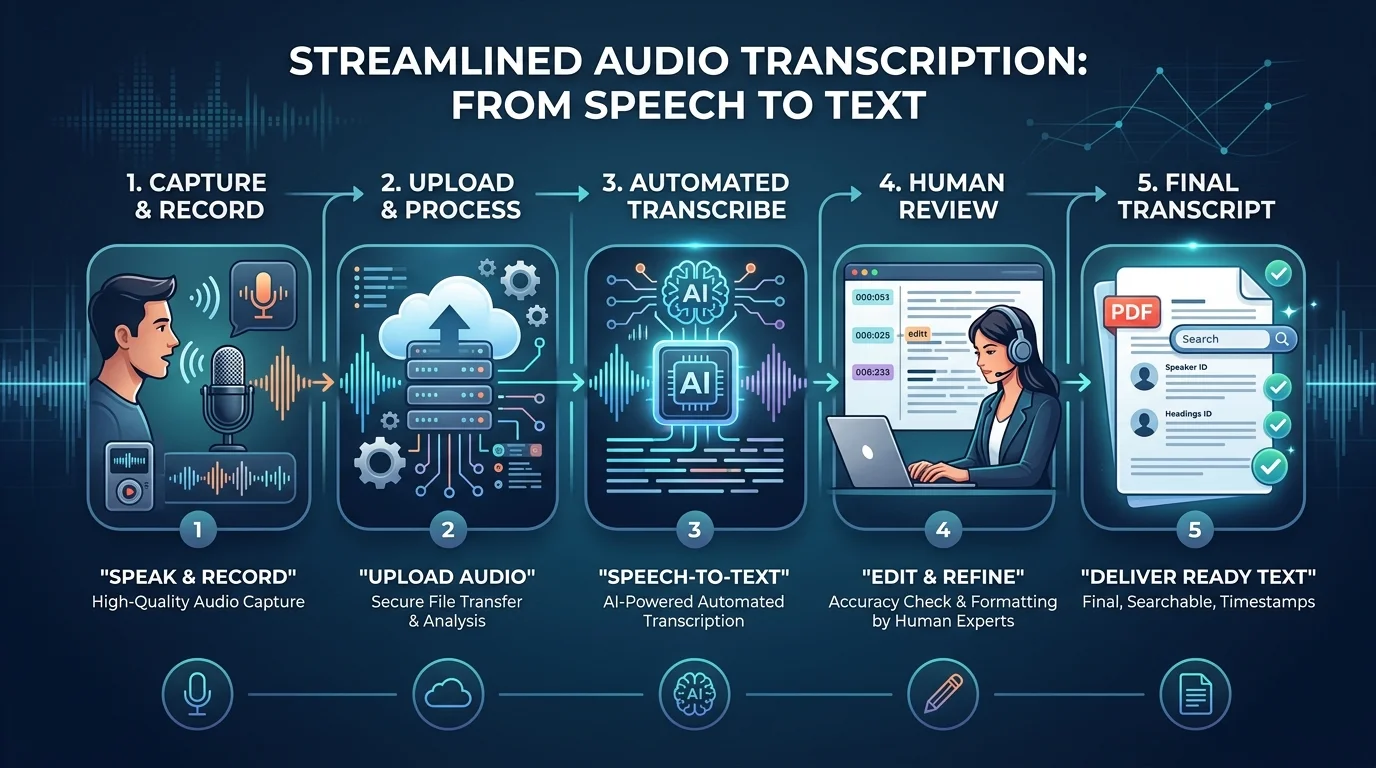
There are two main ways to get from audio to text. One uses software. The other uses a human ear. Each has its place, and understanding both helps you pick the right method for your project.
AI-Based Transcription
AI transcription tools rely on natural language processing and machine learning transcription models. The most well-known is Whisper, an open AI transcription engine built by OpenAI. These systems break audio into tiny chunks, study the sound patterns, and match them to words using massive training data. Many services now run this on GPU-powered transcription servers, so a full hour of audio can be turned into a transcript generator output in just a few minutes. Speed and cost are the biggest wins here.
Manual and Human Transcription
Human transcription still matters for tricky jobs. Legal depositions, medical dictation, and very noisy recordings often need a trained ear. A person can catch context that software sometimes misses, like sarcasm or a mumbled name. It costs more and takes longer, but for high-stakes documents, it remains the gold standard.
The Hybrid Approach
Many teams now blend both methods. They let AI create a rough draft, then have a human editor polish it. This hybrid method saves time while keeping accuracy high, and it's quickly becoming the standard for professional-grade transcripts.
How to Transcribe Audio to Text in 3 Steps
Getting a transcript today is far simpler than it used to be. Most tools now follow the same basic path, no matter which platform you choose.
First, you complete a file upload by dragging your recording into the tool or picking it from your device, Google Drive, or Dropbox. You can even paste a YouTube link on some platforms. Second, the software runs the audio through its speech recognition technology, breaking down sound waves and matching them to text at high speed. This is often called real-time transcription, since results can appear in minutes rather than hours. Third, you review the draft, fix any errors in the built-in transcript editor, and then download transcript files in the format you need, such as DOCX, PDF, or TXT.
That's it. Three steps, and your spoken words become a clean, searchable document ready to share or store. For a more detailed walkthrough, check out this full guide on how to transcribe audio to text.
Key Features to Look for in a Transcription Tool
Not every transcription service is built the same way. Before picking one, it helps to know what separates a great tool from a mediocre one.
Transcription accuracy is the first thing to check. Look for services that mention numbers like 99% accuracy or higher, since this tells you how close the output will be to a perfect, human-level transcript. Speaker recognition, sometimes called speaker labeling or multi-speaker detection, matters a lot for meetings and interviews, because it tags who said what. Background noise handling and accent recognition decide how well the tool performs with real-world audio, not just studio-quality clips. Many premium tools also include audio restoration and noise reduction features that clean up a file before transcribing it.
File limits matter too. Check the file size limit, whether large file uploads are supported, and if the plan offers bulk transcription or unlimited transcription for heavy users. If most of your recordings are in one format, tools built to convert MP3 to text can save you extra steps. Finally, look at security. A trustworthy platform will mention data privacy, encrypted files, and compliance labels like GDPR compliant or SOC 2 compliant, since your recordings often contain sensitive information.
Best Audio Transcription Tools Compared
Choosing a tool comes down to your budget, your file sizes, and how many languages you need. Below is a side-by-side look at some of the top names in the space right now.
Tool | Accuracy | Free Tier Limit | Languages | Starting Price | Best For |
|---|---|---|---|---|---|
TurboScribe | 99.8% accuracy | 3 files/day, 30-min limit | 98+ languages | $10/month | Bulk and unlimited transcription |
HappyScribe | Up to 99% accuracy | Limited free minutes | 150+ languages | Free tier + paid plans | Teams and multilingual support |
Adobe Podcast Studio | High accuracy | Free with sign-in | Multi-language support | Free / Premium plan | Editing audio like a document |
AudioToText.com | 99% accuracy | 100% free, no signup required | Multiple formats supported | Free | Quick, no-signup jobs |
TurboScribe stands out for its claim of 45,396,390 hours transcribed and its 10 hour uploads with a 5GB limit, letting users handle up to 720 hours/month. HappyScribe has built trust with over 6M+ users and 41,000+ teams, backed by a 4.7/5 Trustpilot rating. Adobe Podcast Studio lets you edit a transcript like a normal text document, cutting and pasting words directly. AudioToText.com promises no credit card required and no signup required, which appeals to first-time users who just want a quick, free trial style test. Each platform has its strengths, so match the tool to the job in front of you. If you're weighing a smaller alternative against a bigger name, this AudioToTextify vs Otter.ai comparison breaks down the differences in plain terms.
Audio Transcription by Use Case
Different jobs call for different features, and knowing your use case helps you pick a smarter workflow.
Meetings and Business Calls
Meeting transcription helps business teams turn Zoom calls and conference discussions into searchable notes. Instead of scrambling to take notes live, teams can review the full transcript later and pull out action items with confidence.
Interviews and Podcasts
Interview transcription and podcast transcription are popular with journalists and content creators. A clean transcript makes it easy to pull quotes, write show notes, or repurpose an episode into a blog post.
Education and Lectures
Lecture transcription gives students a written record of class sessions. Instead of scribbling notes during a fast-paced lecture, students can focus on listening and review the transcript afterward for revision and studying. Many students now rely on a dedicated AI transcription tool for students to keep up with heavy course loads.
Content Creation and Subtitles
Creators use transcripts as the backbone of new content. A transcript can be turned into blog posts, social captions, or subtitles using a caption generator or subtitle generator, stretching one recording into several pieces of content.
UX Research and Customer Interviews
UX research and customer research teams transcribe user interviews and usability tests to build clean research documentation. This makes it far easier to search for patterns across dozens of interviews instead of replaying hours of raw audio. If you work in academia or product research, this guide on how to analyze interview transcripts for qualitative research is worth bookmarking.
Legal and Journalism
Legal teams and journalists often need word-for-word accuracy for depositions, court hearings, and press interviews. Here, a wrong word can change the meaning of a whole sentence, so careful review matters more than speed.
Supported Languages, Accents & Audio Quality Handling
One of the biggest questions people ask is whether these tools work outside of English. The good news is that most modern platforms offer strong multi-language support.
Services like HappyScribe support 150+ languages, while TurboScribe covers 98+ languages and offers translation into 134+ languages. This means you can achieve multilingual transcription, and even transcribe in any language directly to English if needed. Language detection usually happens automatically, though manually selecting your language can boost accuracy further.
Real-world audio is rarely perfect. Background chatter, wind noise, or a thick accent can trip up even a strong model. That's why accent recognition and background noise tools matter so much. A helpful trick before uploading is to run your file through a noise reduction tool first, since cleaner audio almost always leads to a more accurate transcript. If your recording has multiple voices talking over each other, expect a small drop in accuracy, since overlapping speech is still the hardest challenge for any speech recognition technology.
Audio Transcription Pricing: Free vs. Paid Plans
Cost is often the deciding factor when choosing a service, so it helps to understand what "free" really means.
Most platforms offer a free plan with daily or monthly limits, such as a handful of files per day or a short maximum recording length. These free tiers are great for testing a service, but they often come with slower processing speeds and smaller file caps. Paid pricing plans unlock unlimited transcription, priority processing, and higher file size limit allowances, which matter a lot if you regularly handle large file uploads.
There's a hidden cost worth mentioning too: waiting time. Free users are often placed in a slower queue, so a file that takes two minutes on a paid subscription might take twenty minutes on a free account. If you transcribe often, the time saved on a paid plan usually outweighs the monthly fee.
Common Mistakes & Limitations in AI Transcription
No transcription tool is perfect, and knowing the weak spots helps you avoid frustration later.
The most common issue is overlapping speech. When two people talk at once, even the best AI transcription engine struggles to separate the words cleanly. Heavy accents, technical jargon, and industry-specific terms can also confuse the system, leading to small errors that need a manual fix. Another common mistake is trusting the output blindly. Even with 99.8% accuracy, a one-hour recording can still contain a handful of mistakes, so a quick read-through before sharing is always smart.
File format issues also trip people up. Uploading an unsupported file, or one that's larger than the file size limit, will cause an upload to fail. Always check the list of supported formats before starting, and compress large files if needed. Treating a machine-made transcript as a rough draft, rather than a finished document, will save you from awkward surprises down the line.
Frequently Asked Questions
Is audio transcription free?
Yes, many tools offer a free plan with daily limits. Paid plans remove those caps and add extra features like unlimited transcription.
How accurate is AI transcription?
Top tools now claim 99% accuracy or higher, though results depend on audio quality, accents, and background noise.
Which file formats are supported?
Most platforms accept audio file formats like MP3, WAV, M4A, AAC, FLAC, and OGG, along with video file formats such as MP4, MOV, AVI, and MKV.
Can I export transcripts to Word or PDF?
Yes, standard export formats include DOCX, PDF, TXT, SRT, VTT, and CSV, covering both document and subtitle needs.
How do I label different speakers?
Look for a speaker recognition or speaker labeling setting, usually found under advanced upload options.
Can transcripts be translated?
Yes, many services support translation into dozens of languages, some offering up to 134+ languages for translated output.
Start Transcribing Your Audio Today
Audio transcription has moved from a slow, manual chore to a fast, AI-powered process anyone can use. Whether you're a student handling lecture transcription, a podcaster building a subtitle generator workflow, or a business team documenting meetings, there's a tool built for your exact need.
Pick a platform that matches your file sizes, language needs, and budget, then start turning your audio and video to text today. Your next transcript is only a few minutes away.
Read more: Best AI Transcription Tool for Podcasters