Yes, you can unsend an email, but only for a few seconds after you hit send, and only on certain platforms. Gmail's Undo Send holds your message for 5 to 30 seconds before it actually leaves your outbox, giving you a brief chance to cancel it. Outlook offers a similar Undo Send delay plus a separate Recall feature that can pull back messages already delivered, though Recall only works between Microsoft 365 or Exchange accounts inside the same organization. Once an email reaches an outside inbox — Gmail, Yahoo, or a different company's server — there is no way to remove it. This guide covers exactly how each method works, when it fails, and what to do if your window has already closed.
Key Takeaways
Gmail: Undo Send window is 5–30 seconds (desktop, customizable); fixed at 5–7 seconds on mobile.
Outlook: Undo Send ranges from 10 seconds up to 120 seconds on Mac; Recall works only within the same Microsoft 365/Exchange organization, on unread messages.
Yahoo Mail: No unsend feature exists at all.
Cross-provider recall (Gmail ↔ Outlook, or between separate companies) is not available yet; Microsoft's cross-tenant recall is targeting general availability around August 2026.
After the window closes: there is no way to remove a delivered email — a fast follow-up message is your best fix.
What "Unsending" an Email Actually Means
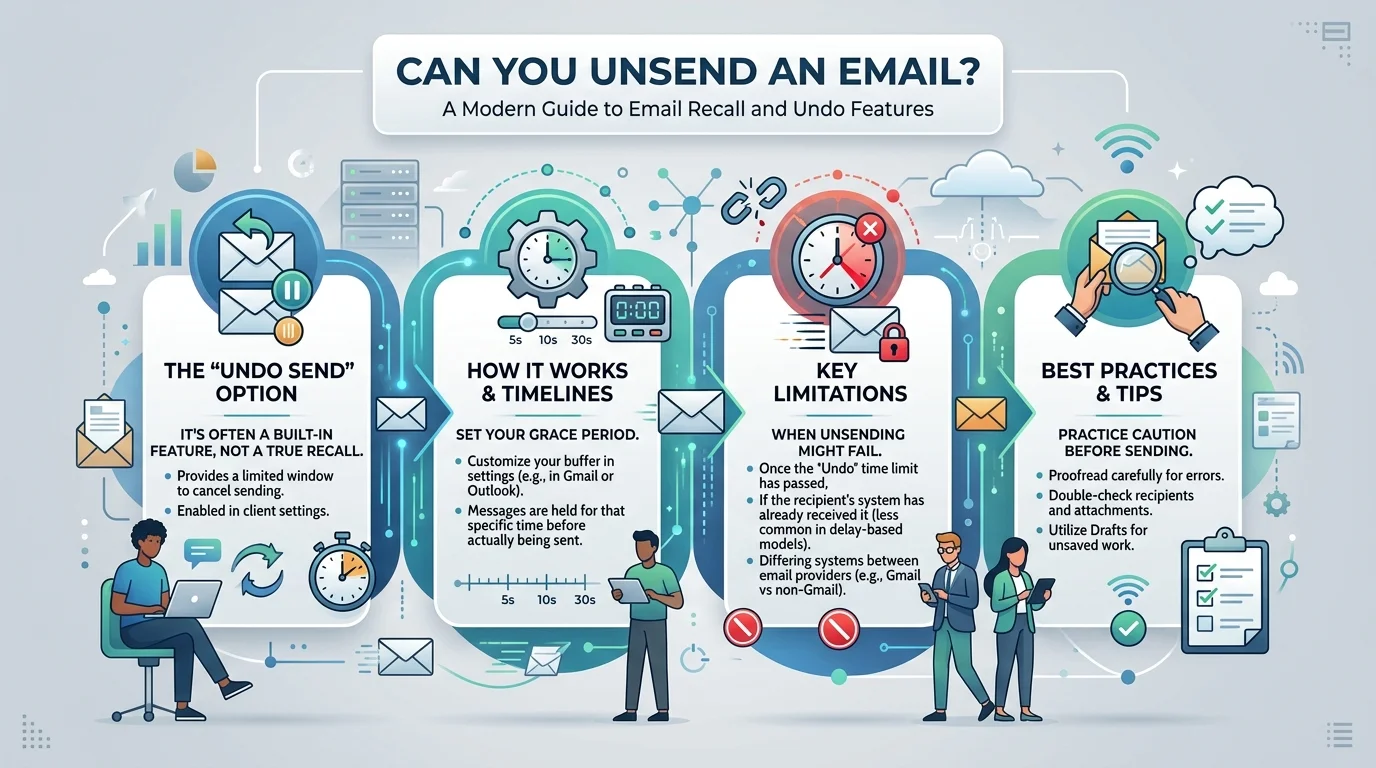
Unsending an email doesn't mean deleting it from someone else's inbox after they've seen it. It means one of two different things, depending on the tool:
Send delay (Undo Send): The email sits in a temporary queue for a few seconds before it's actually transmitted. Clicking "Undo" during that window cancels delivery entirely, as if you never sent it.
Recall: The email has already been delivered. A recall request asks the recipient's mail server to delete or replace it. This only works under narrow conditions and can fail silently.
<cite index="5-1">You cannot delete a sent email from the recipient's inbox in most cases, though services like Outlook's recall feature offer some post-send control in very limited circumstances.</cite>
How to Unsend an Email in Gmail
Gmail's Undo Send is a delay-based system, not a true recall. <cite index="9-1">It gives you a window of 5 to 30 seconds after pressing send to cancel the message, and you can customize this period in Gmail's settings.</cite> If you miss the window, the email is gone for good, with no way to retrieve it once it's landed in the recipient's inbox.
Steps to enable and extend Undo Send on desktop:
Open Gmail and click the gear icon, then See all settings.
Stay on the General tab and scroll to Undo Send.
Set the Send cancellation period to 30 seconds (the maximum).
Click Save Changes.
(Screenshot placeholder: capture Gmail's General settings tab showing the Undo Send dropdown set to 30 seconds, for the final published version.)
<cite index="16-1">The default cancellation period is only 5 seconds on desktop, which is barely enough time to notice a mistake, so changing it to the 30-second maximum before you need it is the single most useful step in this guide.</cite>
On mobile: <cite index="9-1">The Gmail app doesn't let you set a custom cancellation period. You get a fixed 5-second window on the mobile app, after which the message is opened automatically for editing if you tap Undo in time.</cite> <cite index="16-1">The Gmail iPhone app specifically uses a 7-second window that can't be changed from the app itself.</cite>
Important limitation: Undo Send only works before the email leaves Google's servers. Once that window passes, Gmail has no recall feature for standard personal accounts. <cite index="8-1">Recalling a delivered Gmail message is only possible for organizations on the same Google Workspace domain using a third-party admin tool, and this isn't available to personal Gmail accounts.</cite>
How to Recall or Unsend an Email in Outlook
Outlook splits this into two separate tools that get confused constantly:
Undo Send (delay-based, works anywhere)
<cite index="3-1">New Outlook and Outlook on the web let you turn on Undo Send under Settings, Mail, Compose and reply, offering up to 30 seconds of delay, though some accounts are still limited to 10 seconds while the feature rolls out.</cite> <cite index="3-1">Outlook for Mac offers the longest delay of any Outlook client, up to 120 seconds, while personal Outlook.com accounts are capped at 5 or 10 seconds.</cite> <cite index="3-1">Classic Outlook for Windows has no built-in Undo Send; the closest workaround is a rule that delays delivery by a set number of minutes, which requires Outlook to remain open.</cite>
Recall This Message (works only inside your organization)
<cite index="5-1">Outlook's Recall works reliably only when both sender and recipient use Microsoft Exchange within the same organization, the message is still unread, and the recipient is using Outlook or a compatible client.</cite> <cite index="6-1">You'll access it from the Sent Items folder through the menu bar, and if recall succeeds you'll get a status notification for each recipient.</cite>
(Screenshot placeholder: capture the Outlook "Actions > Recall This Message" menu from an open Sent Items email, for the final published version.)
Recall frequently backfires. <cite index="6-1">A failed or attempted recall often generates a notification to the recipient that you tried to pull the message back, which can draw more attention to it than if you'd left it alone.</cite>
What about emails sent to outside addresses? <cite index="2-1">Messages sent to external addresses on Gmail, Yahoo, or another organization's Microsoft account cannot currently be recalled, though Microsoft has cross-tenant recall on its roadmap, targeting general availability around August 2026.</cite> <cite index="3-1">A limited exception is rolling out starting mid-August 2026 that would let two different Microsoft 365 organizations recall messages between each other, but IT admins on both sides have to enable it first.</cite>
Comparison Table: Undo Send vs. Recall by Provider
Feature | Gmail Undo Send | Outlook Undo Send | Outlook Recall | Apple Mail / Yahoo |
|---|---|---|---|---|
How it works | Delays sending | Delays sending | Deletes delivered message | Delay only (Apple); none (Yahoo) |
Max window | 30 seconds | 10–120 seconds (client-dependent) | No time limit, but message must be unread | ~10–30 seconds (Apple) |
Works cross-provider? | ❌ | ❌ | ❌ (internal org only, for now) | ❌ |
Works after recipient opens it? | N/A (pre-send) | N/A (pre-send) | ❌ | N/A |
Available on mobile? | ✅ (fixed window) | Partial | ✅ (rolling out) | ✅ |
Why Email Recall Fails So Often
Recall depends on the recipient's server cooperating with your request, and most external servers simply ignore it. <cite index="4-1">Recall can delete or replace a delivered email, but it only works under strict conditions and often fails, and Outlook's Undo Send isn't available on mobile at all in older builds, while Recall itself only started rolling out on iOS and Android as of February 2025.</cite>
Common reasons recall doesn't work:
The recipient uses a different email provider entirely (Gmail, Yahoo, iCloud).
The recipient already opened the message before the recall request arrived.
Your organization has settings that block recalling read emails.
The recipient is on a mobile client that doesn't process recall requests the same way.
<cite index="7-1">Outlook's mobile apps in particular have no recall option at all, in-app or through web access, according to Microsoft's own support forum.</cite>
What to Do If You Can't Unsend an Email
Once the window has closed and recall isn't an option, damage control beats denial. <cite index="1-1">A quick follow-up message such as "please disregard my previous email, here's the updated version" is often faster and cleaner than a failed recall attempt, and for sensitive mistakes a short, professional apology goes a long way.</cite>
Practical next steps:
Send a correction email immediately — reference the original so context isn't lost.
Call or message the recipient directly if the content was sensitive (wrong attachment, private data).
Ask them to delete it — this works on trust, not technology, but it's often the only option with providers like Yahoo that have no recall feature at all.
Report it internally if confidential company data was involved, so IT or legal can advise on next steps.
How to Avoid Needing to Unsend an Email
Turn on Undo Send at the maximum delay on every account you use.
Draft the email body before adding any recipients, so autocomplete can't send it prematurely.
Use scheduled send for anything written outside working hours or under stress.
Double-check attachments and recipient names before hitting send, especially with autocomplete-heavy address books. Getting the basics right, like knowing what CC in email means before you add recipients, prevents a lot of these mistakes in the first place.
A clean send starts with a clean close too. Our guide on how to end an email covers sign-offs that keep your messages professional and reduce the kind of last-second edits that cause accidental sends.
Frequently Asked Questions
Can you unsend an email after 24 hours?
No. Undo Send windows max out at 30 seconds on Gmail and up to 120 seconds on Outlook for Mac. Recall can technically work longer than that, but only if the message is still unread and both accounts are on the same Microsoft 365 organization.
Can you unsend an email on Yahoo Mail?
<cite index="3-1">No, Yahoo Mail doesn't have a built-in unsend feature. The only workaround is contacting the recipient directly and asking them to delete the message.</cite>
Does the recipient know if you unsend an email?
If you cancel within the Undo Send window, no — the email was never actually delivered, so there's nothing for them to see. If you attempt a Recall on a delivered message, <cite index="6-1">the recipient may get a notification that you tried to recall it, which can draw more attention to the mistake.</cite>
Can you unsend an email in Outlook on your phone?
Recall has started rolling out on mobile as of 2025, but support is inconsistent across builds. <cite index="7-1">Some Outlook mobile users report no recall option exists at all, in-app or via web access.</cite>
Why does Gmail's Undo Send only last a few seconds?
<cite index="10-1">Google currently documents 30 seconds as the maximum cancellation period, with no setting to extend it further.</cite> The delay exists to catch immediate mistakes, not to give you unlimited time to reconsider.
Is there a way to recall an email sent to a Gmail address from Outlook, or vice versa?
Not yet for individual users. <cite index="2-1">Cross-provider and cross-tenant recall is on Microsoft's roadmap, targeting general availability around August 2026, but it will require both organizations to opt in.</cite>
Conclusion
Unsending an email is real but narrow: Gmail and Outlook both offer a short delay window that stops a message before it's delivered, and Outlook adds a Recall feature that sometimes pulls back messages already sent — but only within the same Microsoft 365 organization, and only if the recipient hasn't opened it. Once an email lands in an outside inbox, your best move is a fast, clear follow-up rather than relying on recall to work. Set your Undo Send window to the maximum on every account today; it takes under a minute and is the only unsend method that works every time.