The best way to end an email is with a clear closing line, a sign-off that matches your relationship with the recipient, and a clean signature. Formal emails call for "Best regards" or "Sincerely," while casual ones can use "Thanks" or "Cheers." Get this right, and you'll leave a stronger last impression every single time.
I've sent thousands of emails in my career, and I'll be honest with you — for years, I had no idea how to end an email properly.
I'd just type "Best," slap my name under it, and hit send.
Turns out, that's a mistake. Your email sign-off is the last thing your reader sees, and it shapes how they remember your entire message. So today, I'm going to walk you through exactly how to nail your email closing, step by step.
Let's dig in.
Why Your Email Ending Actually Matters
Here's the thing: you probably spend all your energy on the subject line and the opening.
But the ending? That's where people tune out — and where they judge you.
Your email etiquette at the close of a message signals professionalism, warmth, or carelessness in about two seconds flat. According to Grammarly's guide on ending emails, the wording you choose "shapes their impression of both the message and you as the sender." That's not fluff — that's real.
A 2026 breakdown from Respona found that most professionals default to just five or six sign-offs on repeat — which means a thoughtful one actually stands out.
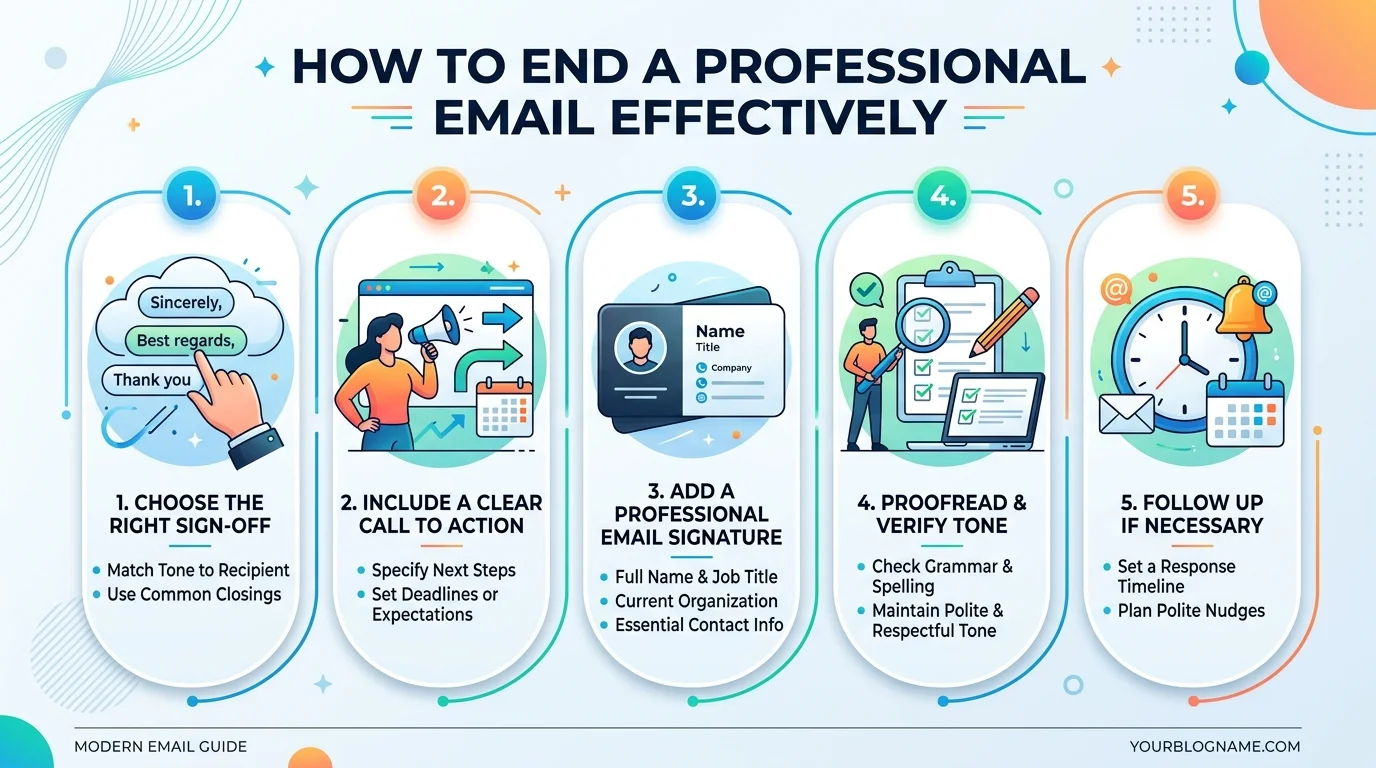
The Three Parts of a Great Email Ending
You need three things, every single time:
A closing line (your final sentence)
A sign-off phrase (like "Best regards")
Your email signature
Miss one of these, and your email feels unfinished. Trust me on this one.
Step 1: Write a Strong Closing Line
Okay, so before you even think about "Sincerely" or "Cheers" — you need a closing line.
This is the sentence right before your sign-off. It's your last chance to be clear.
Something like "Please let me know if you have any questions" works because it reinforces your message and tells the reader exactly what to do next, as Grammarly notes.
Pro tip: Always end your closing line with a clear call to action. What do you want the reader to do? Say it plainly. If you want your whole message to land well from the start, it also helps to begin with the end in mind — decide what outcome you want before you even start typing.
Step 2: Pick the Right Sign-Off
Now here's where it gets fun — and a little tricky.
Unlike old-school letter writing, where "Yours faithfully" was basically mandatory, modern email has no fixed rules. You get to use judgment here.
But judgment doesn't mean guessing. Match your email tone to the relationship you have with the recipient.
To make this dead simple, I built what I call the Sign-Off Formality Scale — a quick way to match your closing to the situation: Read Also: Can You Unsend an Email? Complete 2026 Guide
The Sign-Off Formality Scale
Sign-Off | Formality Level | Best Use Case | Example |
|---|---|---|---|
Sincerely | Very Formal | Cover letters, legal correspondence | "Sincerely, John" |
Respectfully | Very Formal | Senior executives, clients you've never met | "Respectfully, Maria" |
Best regards | Formal | First-time client emails, job applications | "Best regards, Sam" |
Kind regards | Formal | External business correspondence | "Kind regards, Priya" |
Best | Semi-Formal | Ongoing client or coworker emails | "Best, Alex" |
Thanks | Casual-Professional | Follow-ups, internal requests | "Thanks, Jamie" |
Cheers | Casual | Coworkers you know well | "Cheers, Tom" |
Take care | Casual | Friendly check-ins | "Take care, Nina" |
Formal Email Sign-Offs
Use these when you're emailing:
A client you've never met
A hiring manager
Someone senior to you
The Forage's guide to professional email closings points out that these phrases should be "professional and not too familiar" — the perfect way to put it.
Casual (But Still Professional) Sign-Offs
For coworkers or people you know well, Thanks, Best, Cheers, and Take care all work well.
Interesting stat here — Omnisend's research found that Gen Z workers typically save trendier, humorous sign-offs for internal chats. When it's a client or senior colleague on the other end, they default right back to "Best regards." This kind of tone-matching matters especially when you're delivering sensitive feedback — the same instincts that go into giving constructive criticism apply just as much to how you sign off.
Sign-Offs to Avoid (Seriously, Just Don't)
I'm going to be blunt here.
"Have a blessed day" — only use this if you know your recipient will appreciate the religious tone, per Hunter.io's breakdown
"Xoxo" — save it for your significant other, not your boss (Brafton says it best)
"Your friend" — too casual for business email etiquette
"Take care" — can accidentally sound ominous, like something's wrong
Step 3: Build a Signature That Works
Your email signature is your last impression — literally.
At minimum, it should include your full name, job title, company name (if relevant), and contact info.
Respona's guide adds that you can also include links to your professional profiles, but don't overdo it.
And here's something a lot of people forget: accessibility. Brafton points out that your signature should be formatted so people with visual impairments can actually read it. That's just good practice in 2026.
A Quick Step-by-Step Recap
Write a clear, action-oriented closing line
Choose a sign-off using the Sign-Off Formality Scale above
Add a clean, accessible signature
Double-check the recipient's name is spelled right
Read it out loud before you hit send
How to Match Sign-Offs to Different Situations
For a Cold Email
Keep it warm but professional. Try "Looking forward to hearing from you" or "Best regards."
For a Follow-Up Email
Something like "Thanks in advance" nudges the reader toward action without sounding pushy.
For a Job Application or Cover Letter Closing
Stick to the classics — sincerely or best regards. This isn't the place to get creative.
For Client Emails
WiseStamp's list of sign-offs suggests "Respectfully" or "Warm regards" when you're communicating with a client, boss, or someone you don't know well.
Frequently Asked Questions
What's the most professional way to end an email?
"Sincerely" or "Best regards" are the safest, most universally professional choices — especially for first contact or formal correspondence.
Is "Best" too casual for a work email?
No — "Best" sits in the semi-formal zone on our Formality Scale and works fine for ongoing professional relationships, just not for first impressions.
Should I use "Regards" or "Best regards"?
Both are formal and interchangeable. "Best regards" feels slightly warmer; "Regards" alone can read a touch curt.
Can I use emojis in a professional sign-off?
Generally, no — stick to text-only sign-offs for business emails unless your workplace culture is very casual.
What sign-off should I avoid completely at work?
Avoid "Xoxo," "Love," and overly religious phrases like "Have a blessed day" unless you know the recipient well.
My Honest Take
Look — I know sign-offs feel like a small detail.
But small details add up. In professional correspondence, the ending is often what people remember most, especially if the email is short.
So next time you're about to type "Best" out of pure habit, pause for a second. Think about who's reading it. Think about the email tone you actually want to set.
It takes five extra seconds. It's worth it.
Once your email is polished and ready to send, make sure it actually reaches its destination. If you're getting a 'Cannot Get Mail' error instead, here's how to fix it
Read More: CC in Email Explained: Meaning & Etiquette