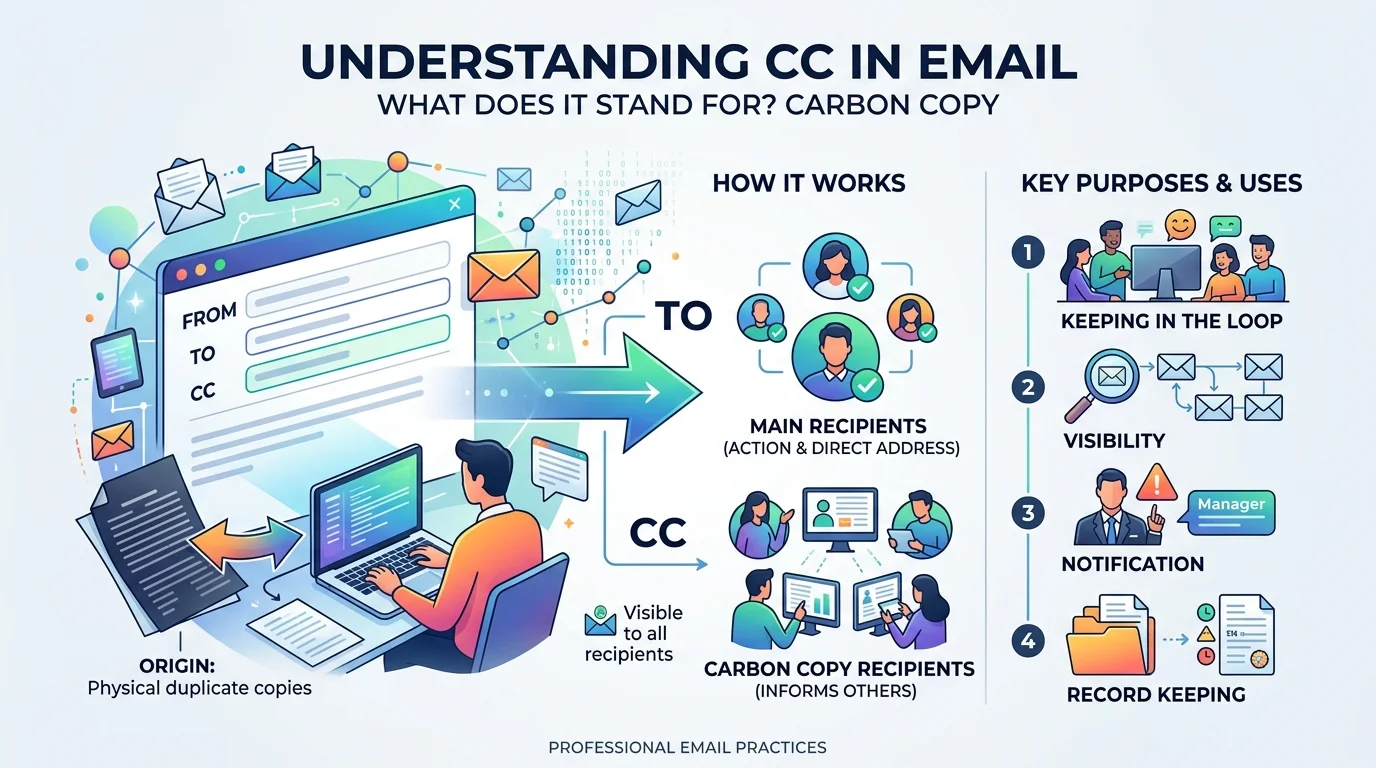
CC stands for "carbon copy." It's a field in every email client that lets you send a copy of a message to people who aren't the primary recipient. Everyone in the CC field can see who else was copied, unlike BCC, where recipients stay hidden from each other. You use CC in email to keep people informed without expecting them to reply or take action. The term comes from carbon paper, used to make duplicate copies of typed letters before computers existed.
That's the short answer. Below, you'll get the full breakdown: how CC works, how it differs from BCC, when to use it, the etiquette rules that keep you from looking unprofessional, and a step-by-step guide you can follow right now.
What Does CC Mean in Email?
CC is short for carbon copy, and it's a holdover from a much older technology.
Before computers, people used actual carbon paper to make duplicate copies of letters. A sheet of carbon-coated paper sat between the original and a blank page, so whatever you typed transferred onto the second sheet. That second sheet was the "carbon copy."
When email arrived, the term carried over. As Campaign Monitor explains, CC and BCC are simply two ways to include additional recipients in an email.
So when you CC someone, you're sending them the full message. They just aren't the person you're directly asking to respond.
This is one of several small email habits worth getting right. If you also want to nail the closing line of your messages, see how to end an email for the phrasing that works best in professional threads.
CC vs. To: What's the Difference?
The To field is for whoever you expect a response or action from. The CC field is for people who need visibility and nothing more.
Field | Who goes here | Expected to reply? | Visible to others? |
|---|---|---|---|
To | The person responsible for acting | Yes | Yes |
CC | People who need to stay informed | No, unless addressed directly | Yes |
BCC | People who need a copy privately | No | No |
That distinction is the whole point of the feature: To means "please act." CC means "FYI."
CC vs. BCC: Don't Mix These Up
Both fields add extra recipients. The difference is visibility.
With CC, every recipient can see everyone else who was copied. With BCC (blind carbon copy), those recipients are hidden from the rest of the group entirely.
Grammarly notes that people in the CC field are typically there "for awareness rather than action," and that visibility is what creates transparency across the thread (Grammarly).
BCC works the opposite way. Gmail's own documentation confirms that BCC recipients can't see who else is in that field, and if someone replies all, BCC'd people don't receive that reply.
Simple rule: use CC for transparency. Use BCC for privacy.
When Should You Use CC?
Reach for CC when you want to:
Keep a manager or stakeholder informed without asking them to respond
Introduce two people while staying copied on the exchange
Create a documented record multiple people can reference later
Loop in a teammate who needs context but isn't driving the task
Example: you're emailing a vendor about a contract update. The vendor goes in To. You CC your manager so they see the exchange happen, with no expectation they'll reply.
This kind of visibility matters even more once a new hire joins a project. If you're welcoming someone into a thread for the first time, pair your CC with a proper welcome to the team message so the context is clear from their first email.
CC Etiquette: Six Rules That Prevent Awkward Threads
Name one owner in the To field. Leaving several people in "To" makes it unclear who's actually responsible for replying.
State why you added someone. One clause is enough: "copying Priya so she has the final numbers." It heads off the "why am I on this?" reply.
Don't CC a manager as a power move. Adding someone's manager mid-thread without explanation can read as an escalation tactic. If there's a real reason, say it directly.
Reply to the sender by default, not reply-all. Reply-all is for answers the entire CC'd group actually needs. This single habit prevents most inbox disasters.
Move people to BCC when closing a thread. If a long back-and-forth is wrapping up and someone's part is done, shift them to BCC and say so in one line.
Trim the CC list as the thread ages. People who needed context on day one rarely need it by day nine.
How to CC Someone: Step-by-Step
Open a new email or reply to an existing thread
Add your primary recipient to the To field
Click the CC field, usually visible below To or under "Add Cc"
Enter the addresses of anyone who needs visibility, not action
Add one short line explaining why they're copied
Review before sending — everyone in CC sees everyone else, so sensitive information belongs in BCC or a private message instead
Is CC Still Relevant in 2026?
Yes, though its role has narrowed. As internal team communication shifts to Slack, Teams, and shared workspaces, CC is settling back into its original purpose: an occasional update for someone outside the immediate conversation, rather than the default for daily collaboration.
That shift makes CC more intentional, not less useful. Used sparingly and with context, it still signals professionalism in a way blanket copying never did.
Frequently Asked Questions
What does CC mean in an email?
CC means "carbon copy." It sends a copy of your email to additional recipients who can all see one another, so they stay informed without being the primary addressee.
Is CC the same as BCC?
No. CC recipients are visible to everyone on the email. BCC recipients are hidden from everyone except the sender.
Should I reply to someone who CC'd me?
Usually no. A CC means you're being kept informed, not asked to act. Reply only if the message directly asks you something.
Can CC recipients see each other's email addresses?
Yes. That visibility is the defining difference between CC and BCC.
When should I use BCC instead of CC?
Use BCC when you need to protect recipients' privacy, such as sending a newsletter to a large list where addresses shouldn't be exposed to one another.
Does CC still matter with tools like Slack and Teams?
Yes, though less for daily back-and-forth. CC now functions mainly as an occasional FYI for people outside a team's primary communication channel.