Quick answer: To deactivate Instagram, open the app, tap your profile picture, then the three lines at the top right. Go to Accounts Center → Profiles and personal details → Account ownership and control → Deactivation or deletion. Pick your account, choose Deactivate account, re-enter your password, select a reason, and confirm. Your profile hides instantly. Nothing is deleted.
You want to know how to deactivate Instagram without nuking eight years of photos, and you want it done in the next four minutes.
I get it.
Here's the thing nobody tells you upfront: the steps you'll find on most "top-ranking" guides are flat-out wrong now. They still tell you to hit "Edit Profile" and scroll for a link that Meta quietly killed. So you tap around, find nothing, and assume you're the problem.
You're not.
In this guide, I'll walk you through the current Instagram deactivation flow inside Accounts Center, the two menu layouts you might see, the weird DM loophole that surprises almost everyone, and what actually happens to your followers while you're gone.
Let's get into it.
What Deactivating Instagram Actually Means
Before you tap anything, you need to understand what you're signing up for — because deactivating your Instagram account and deleting it are two completely different animals, and mixing them up is how people lose photos forever. Deactivation is reversible. Deletion isn't. That single distinction determines whether you get your life back with one login, or spend a week emailing support into the void. So let me break the two apart properly.
Deactivation is a curtain, not an eraser.
Your profile, photos, comments, and likes get hidden from everyone. Your data stays exactly where it is on Meta's servers. Log back in, and it all comes flooding back — same followers, same captions, same embarrassing 2019 gym selfie.
Deletion is permanent.
According to Instagram's Help Centre, a deletion request first parks your account in a 30-day grace period. Change your mind inside that window? Just log in and the deletion cancels itself. Miss it? Everything's gone, and your username gets released back into the wild for anyone to grab.
Here's how I'd think about it:
Deactivate | Delete | |
|---|---|---|
Reversible? | Yes, anytime | Only within 30 days |
Photos & videos | Preserved | Erased permanently |
Your username | Frozen, nobody can take it | Released to the public |
Followers | Kept intact | Gone |
Direct messages | Stay readable to others | Removed after 30 days |
Best for | A social media detox | A clean break |
If you're even 5% unsure, deactivate. You can always delete Instagram permanently later. You can't un-delete.
How to Deactivate Instagram on iPhone and Android
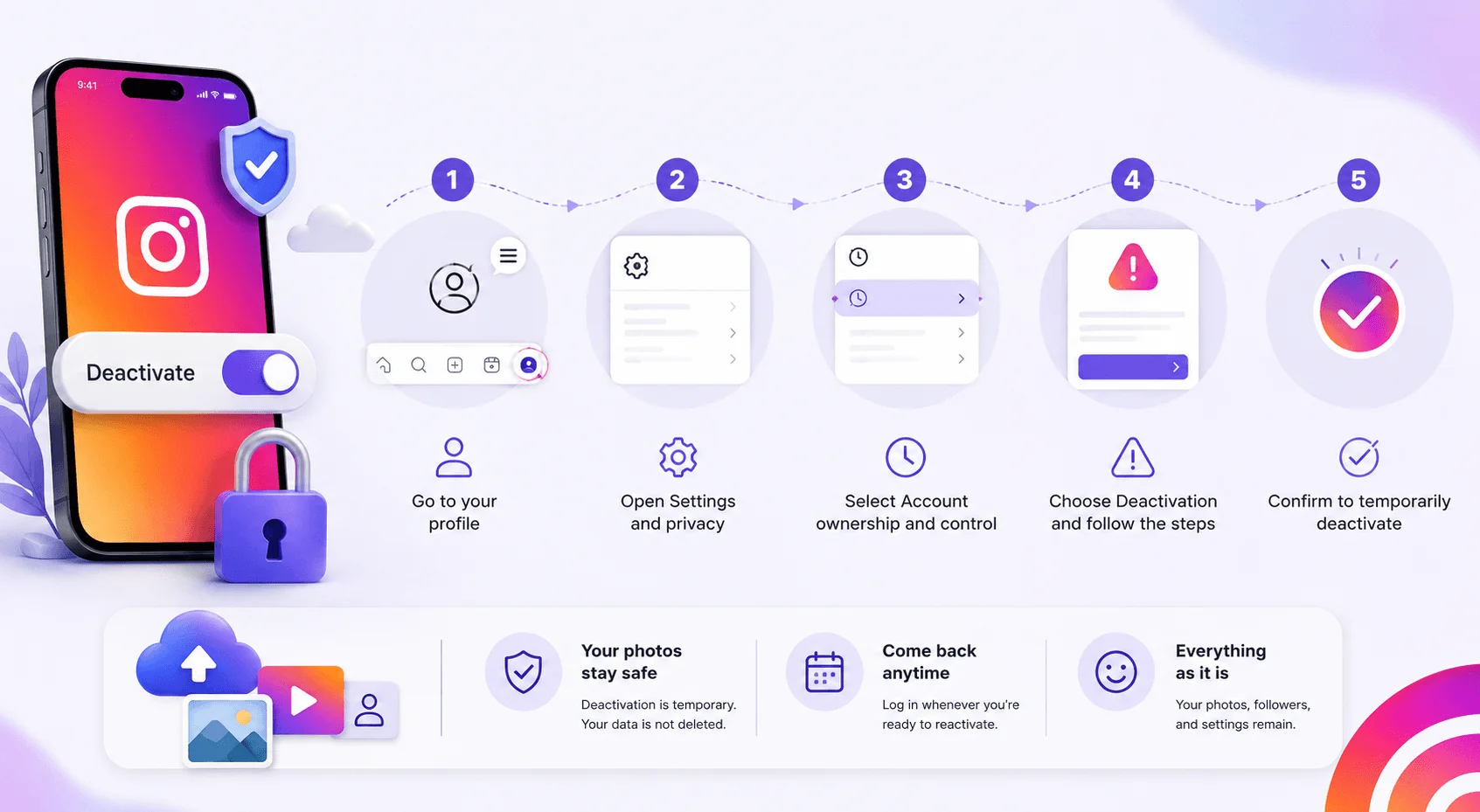
This is the part you came for, so I'm going to be surgical about it. The Instagram app deactivation process now lives inside Meta's unified Accounts Center, which merged Instagram, Facebook, and Threads settings into one hub. That migration is exactly why older tutorials break. Follow the path below on either iOS or Android — the taps are identical on both, and you'll need your password at the end, so have it ready.
Here's the step-by-step:
Open Instagram and tap your profile picture in the bottom-right corner.
Tap the three horizontal lines (the hamburger menu) at the top right.
Tap Accounts Center.
Tap Profiles and personal details.
Tap Account ownership and control.
Tap Deactivation or deletion.
Select the account you want to pause.
Choose Deactivate account, then tap Continue.
Re-enter your password, then tap Continue.
Pick a reason from the dropdown, tap Continue.
Tap Deactivate account one final time.
Done. You're invisible.
The Menu Variation Nobody Warns You About
Quick heads-up, because this trips up a genuinely huge number of people and it's the reason half the comment sections on other guides are full of "this doesn't work." Meta is currently running two different Accounts Center layouts side by side, and which one you get depends on your rollout group rather than anything you did. Both reach the same screen. They just take different doors to get there.
If You See "Accounts" at the Bottom
Go through Personal details → Account ownership and control → Deactivation or deletion.
If You See "Manage Accounts" at the Bottom
Tap Manage next to your profile first, then tap Deactivation or deletion.
As Meta's own Help Centre confirms, both variants are live right now. If a guide doesn't mention this, it was written from memory, not from a phone.
How to Deactivate Instagram on a Computer
Maybe you're at a desk. Maybe you deleted the app already in a moment of decisive rage and now can't get back in to finish the job. Either way, deactivating Instagram on desktop works fine through any browser, and honestly I find it slightly less fiddly than the mobile flow because everything's visible at once. The menu names shift a little on web, so don't expect a pixel-perfect match to the app. Here's the browser route.
Head to Instagram.com and log in.
Click the three horizontal lines at the bottom left, then click Settings.
Click Accounts Center.
Click Personal details.
Click Account ownership and control.
Click Deactivation or deletion.
Select your account, choose Deactivate account, and confirm.
Worth noting: some very popular guides — including Tom's Guide — still claim you must use a browser and that you can't temporarily disable your account from the app.
That hasn't been true for a while. Both work now.
What Happens When You Deactivate Instagram?
Okay, so you've hit the button. What does the world actually see? This is where Instagram deactivation gets genuinely interesting, because "hidden" doesn't mean what most people assume it means. Some things vanish completely. One specific thing absolutely does not. And knowing the difference matters a lot if your reason for leaving involves a particular person you'd rather not have access to you. Let me lay out exactly what changes.
What disappears:
Your profile, photos, videos, and Reels
Your likes and your comments (they vanish from other people's posts — this is what friends notice first)
Your follower and following lists
Your profile picture and story tags
@mentions of you become plain, unclickable text
Anyone who visits your profile URL gets a "Page Not Found" error. To the outside world, you basically stopped existing.
What doesn't disappear: notifications stop, sure — but your data stays fully intact on Meta's side. Photos, followers, saved posts, search history. All of it, waiting.
Does Deactivating Instagram Delete Messages?
No. Deactivating Instagram does not delete your direct messages, and this is the single most misunderstood part of the whole process. I'd argue it's the most important paragraph in this article, because it directly affects whether deactivation achieves what you actually want it to achieve.
Every conversation you've ever had stays sitting in the other person's inbox. Fully readable. Every message you sent, still there, word for word.
Instagram just relabels you as "Instagram User" and swaps your profile photo for a grey silhouette.
That's it. That's the whole disguise.
Anyone who knows the conversation knows exactly who "Instagram User" is. It's not anonymity — it's a name change on an otherwise complete record. The recipient can't send you anything new, and tapping your masked profile leads to a dead end, but the archive is wide open.
So if you're deactivating your account to get distance from someone specific, understand that your old DMs remain readable to them the entire time. Only permanent deletion clears that. It's also worth auditing what else is visible on your device — hidden apps on iPhone are easy to overlook when you're tidying up your digital footprint.
Do You Lose Followers When You Deactivate Instagram?
No — your follower count is frozen, not reset. This is the question I get asked most by people with audiences they've spent years building, and the anxiety is understandable. But the mechanics here are genuinely reassuring, and they're the reason temporary deactivation is a safe move even for creators and small businesses.
Reactivate and everything is restored exactly as you left it.
The only losses are people who genuinely choose to unfollow while you're away — and Instagram can't help you there. If you're coming back and want to rebuild momentum quickly, knowing the best time to post on Instagram matters more after a break than it does normally.
Your username stays reserved too. Nobody can register it while you're deactivated, so you're not in a race to reclaim it when you come back.
Instagram Deactivation Limits: How Often and How Long?
Here's a rule that generates an absurd amount of confusion, and I want to save you from screaming at your screen. Instagram caps how often you can deactivate Instagram, and the error message it gives you is famously unhelpful. Understanding the timing rules before you start means you won't accidentally lock yourself into a version of your account you didn't want. Here's the whole ruleset in one place.
Rule | The reality |
|---|---|
How often can you deactivate? | Once every 7 days |
Maximum time deactivated? | No limit — weeks, months, or years |
Auto-deleted for inactivity? | No, not if you deactivated manually |
How do you reactivate? | Just log back in with your password |
Deletion grace period | 30 days |
Can You Deactivate Instagram Twice in One Week?
No. You can only deactivate once every seven days, and the cap applies to the entire process regardless of which device you use.
So if you deactivate today, reactivate tomorrow out of curiosity, then decide you want out again — you're stuck waiting out the full week.
My honest advice? Treat the once-per-week rule as a feature. It forces you to actually sit with the decision instead of flip-flopping.
How Long Can You Deactivate Instagram For?
Indefinitely. There is no maximum duration on Instagram deactivation.
You can stay hidden for a fortnight or five years. Instagram won't auto-delete your account for inactivity as long as you deactivated it manually yourself.
To reactivate your Instagram account, just log back in with your username and password. That's genuinely the whole process — give it a few hours to fully restore if you've been gone a long time.
Does Deactivating Instagram Affect Threads?
If you're on Threads, you've probably seen scary posts claiming that touching one account kills the other. That fear is a leftover from 2023, and it's now outdated — but a surprising number of 2026 blog posts still repeat it as fact. Since Threads and Instagram share a login, the confusion is understandable, so let me clear it up with what Meta actually says today. This matters if you want to leave one platform and keep the other.
Back at launch, Instagram head Adam Mosseri confirmed the accounts were welded together — deleting one deleted the other — and said the company was "looking into" separating them.
They did.
Meta's current guidance is that you can deactivate or delete your Threads profile without affecting your Instagram account. Threads deletion has its own independent 30-day grace period.
Worth knowing it works both ways too: some users report that deactivating Instagram also hides a linked Threads profile, so check both if you want a total blackout.
Download Your Instagram Data First (Seriously, Do This)
I'd feel bad publishing this without a warning, because I've watched people lose a decade of photos to one impulsive tap. Even though deactivation preserves everything, I'd still grab a backup before you go — mainly because deactivation has a habit of turning into deletion a month later, once you realise how good life feels without the algorithm. Two minutes now saves a lot of grief later. Here's the export process.
Open Accounts Center.
Tap Your information and permissions.
Tap Download your information.
Tap Download or transfer information.
Choose All available information, then Download to device.
Pick your format and media quality.
You'll get a ZIP file with your photos, videos, messages, and stories. Security.org recommends this as a mandatory step before any account removal, and I agree completely. If you'd rather keep the account but reduce your exposure, making your Instagram private is a lighter alternative worth considering first.
Should You Actually Deactivate? What the Research Says
Let's zoom out for a second, because you didn't land here purely for menu instructions — something prompted this. And the science on taking a social media detox is far more interesting than the usual "screens bad" hand-waving. There's now serious experimental evidence, run at genuine scale, with Meta's own cooperation. It's worth two minutes before you decide whether this is a week-long pause or a permanent goodbye.
The largest study of its kind, published in PNAS and co-authored by Northeastern's David Lazer, ran two controlled trials with nearly 20,000 Facebook users and 15,500 Instagram users.
Treatment groups deactivated for six weeks. Control groups deactivated for just one — a clever design that ruled out effects from the deactivation process itself.
The result? Six weeks off Facebook and Instagram was roughly 15% and 22% as effective, respectively, as the average psychological intervention. Not life-changing. Not nothing, either.
The subgroup data is sharper: Facebook benefits skewed toward users over 35, while Instagram gains were highest among women under 25.
But here's the honest caveat, and I'd rather you have it than not. The researchers don't claim all social media is harmful. Active use — messaging, commenting, actually talking to people — carries fewer negative effects than passive scrolling. And simply reducing usage produced meaningful improvements without quitting at all.
There's also genuine dissent. Other research found abstinence produced no measurable daily well-being gain, with some models showing small deficits in social relatedness.
So: the evidence leans positive, but it's a nudge, not a miracle.
My Take Before You Tap the Button
If you're deactivating out of exhaustion, do it. The once-per-week limit means you'll have to sit with it for at least seven days, which is roughly how long it takes for the itch to fade.
If you're deactivating to disappear from one specific person, remember the DM archive stays readable. Deactivation hides your profile, not your history.
And if you're deactivating because you're not sure you want Instagram in your life at all — try the pause first. Download your data, go dark for a month, and see how you feel. Plenty of people use that gap to build something slower instead; starting a podcast on Spotify is a common landing spot for ex-scrollers who still want an audience.
You can always come back with one login.
You can't come back from delete.
![Recover Gmail Password Without Phone Number [2026]](https://contiocdn.com/efdc9a99-5ac4-4f75-be3a-ed43de859d76/blog-covers/1790082232767-y9rtx1hq-recover-gmail-password-without-phone-number--2026-.webp)