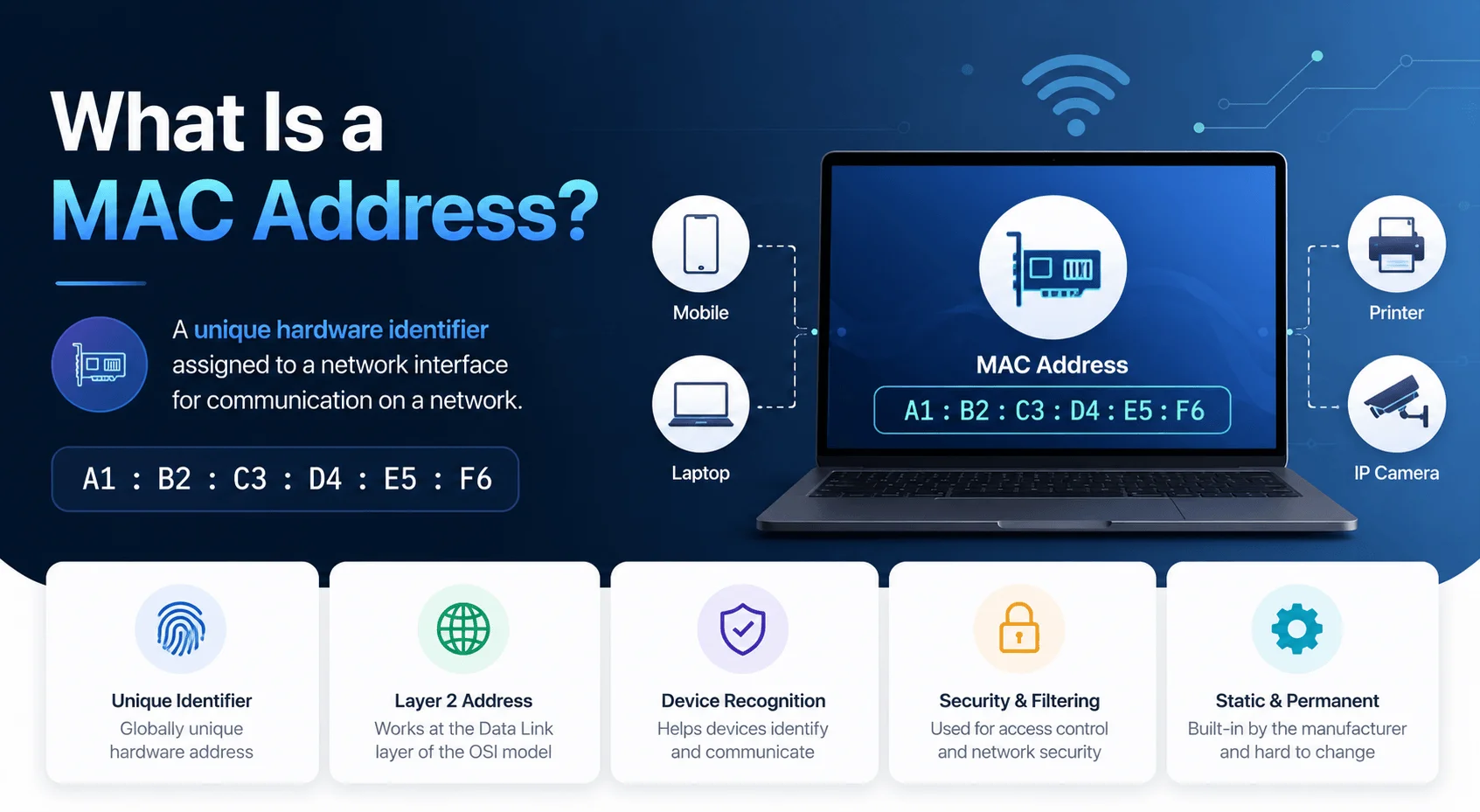
A MAC address (Media Access Control address) is a unique 12-character hardware identifier permanently assigned to your device's network interface controller. It's used to identify your device on a local network, similar to how a serial number identifies a specific piece of hardware. Every phone, laptop, and smart device you own has at least one.
Quick Definition: MAC Address = A unique, hardware-based identifier (e.g., 00:1A:2B:3C:4D:5E) burned into a network interface card by its manufacturer, used at the data link layer to route data within a local network.
Now let me walk you through everything else — how it's structured, why it matters, how it differs from an IP address, and how you can find (or even change) yours.
Let's get into it.
What Is a MAC Address, Really?
Okay, so here's the deal.
A MAC address is a unique identifier that's permanently burned into your device's network interface controller, or NIC for short. Think of it like a fingerprint. No two devices — in theory — share the same one.
This isn't some abstract concept, either.
Every single device you own that connects to a network — your phone, your laptop, your smart fridge (yes, really) — has at least one MAC address baked right into its hardware.
According to TP-Link's networking guide, a MAC address is assigned at the factory and functions like a serial number that never changes, no matter which Wi-Fi network you hop onto.
If you're also brushing up on the basics, it's worth pairing this with our guide on how home networks actually work before going further.
Why Does a MAC Address Exist in the First Place?
Networks need a way to know exactly which device a piece of data is meant for.
Without a hardware address, your router would basically be throwing data into a black hole and hoping it lands somewhere useful.
The MAC address solves this by acting like a digital name tag. Every data packet that moves across your local area network carries the destination MAC address, kind of like the shipping label on a package.
If you're also brushing up on network troubleshooting basics, it's worth checking our guide on what to do when you get a "cannot get mail server" error — a common network-connectivity issue tied to similar underlying protocols.
The Anatomy of a MAC Address (Breaking Down the Format)
Let's slow down for a second because this part trips a lot of people up.
A MAC address is made up of 12 hexadecimal digits, split into six pairs, usually separated by colons or hyphens. Something like this:
00:1A:2B:3C:4D:5E
That address isn't just a random jumble of characters. It's split into two meaningful halves.
Part 1: The OUI (Organizationally Unique Identifier)
The first six digits are called the Organizationally Unique Identifier, or OUI.
This chunk tells you who made the device. Apple, Samsung, Intel, Cisco — every manufacturer gets assigned their own unique OUI by the Institute of Electrical and Electronics Engineers (IEEE).
Part 2: The Device-Specific Identifier
The second half is unique to the individual device itself. The manufacturer assigns this portion, making the address different from every other device off the same production line.
Together, these two halves form a 48-bit identifier.
Types of MAC Addresses
Not all MAC addresses behave the same way. There are a few distinct categories worth knowing:
Type | What It Does |
|---|---|
Unicast | Sent to one specific device on the network |
Multicast | Sent to a defined group of devices |
Broadcast | Sent to all devices on the local network ( |
Universally Administered (UAA) | Factory-assigned, globally unique |
Locally Administered (LAA) | Manually or software-assigned, overrides the factory default |
This distinction matters most when you get into spoofing or randomization, which I'll cover shortly.
MAC Address vs. IP Address: What's the Difference?
People often confuse a MAC address with an IP address, and it's an easy mix-up to make since both are technically "addresses" your device uses on a network.
But they're not the same thing.
Your MAC address is like your home's permanent street address — it never changes.
Your IP address is more like your current GPS location — it shifts depending on the network.
According to Netgear's networking guide, unlike an IP address, a MAC address can't be reconfigured through normal software settings — it's tied to the physical hardware. Your IP address, meanwhile, is assigned dynamically via DHCP and can change every time you connect to a different Wi-Fi network.
Feature | MAC Address | IP Address |
|---|---|---|
Assigned by | Manufacturer | Network/router |
Changes? | Rarely (unless spoofed) | Frequently |
Layer | Data link layer | Network layer |
Format | Hexadecimal | Numeric (IPv4/IPv6) |
Related standard | IEEE 802 | IPv6 uses EUI-64, derived from the MAC address |
If you enjoy these kinds of "what is X" tech breakdowns, you might also like our explainer on what 4K resolution actually means.
Where Does the MAC Address Fit in the OSI Model?
Networking folks love to talk about the OSI model, a seven-layer framework describing how data moves across a network.
Your MAC address lives at Layer 2, the data link layer — specifically within the medium access control sublayer, which is literally where the "MAC" in MAC address comes from.
Your IP address operates one layer up, at Layer 3, the network layer. That's why both addresses exist simultaneously — they solve different problems at different points in the communication chain.
How to Find Your MAC Address (Step-by-Step)
You're probably here because you actually need to find your MAC address — maybe for MAC filtering, troubleshooting, or registering a device on a school or office network.
Here's how, based on guidance from Carnegie Mellon University's IT department:
Device | Steps |
|---|---|
Windows | Settings → Network & Internet → click connection → Properties → Physical Address |
macOS | Apple menu → System Settings → Network → click connection → Details → Hardware |
iPhone | Settings → General → About → Wi-Fi Address |
Android | Settings → About Phone → Status/Hardware Information → Wi-Fi MAC Address |
It takes about 20 seconds once you know where to look.
What Is MAC Filtering, and Should You Use It?
Most modern routers let you create a list of approved MAC addresses — kind of like a guest list at a party. Only devices on that list get let in. You can also flip it around and create a blocklist.
How MAC Filtering Works in Practice
Log into your router's admin panel.
Locate the MAC Filtering or Access Control section.
Add the MAC addresses of trusted devices (or block unwanted ones).
Save and apply — new/unlisted devices are now denied automatically.
The Catch With MAC Filtering
Sounds like a solid security layer, right? Well, sort of.
MAC filtering is a decent first line of defense, especially for home networks. But since MAC addresses can be spoofed (more on that below), it's not something you should rely on as your only protection.
For a broader security setup, see How to Secure Your Home Wi-Fi Network.
MAC Address Spoofing: The Security Risk You Should Know About
MAC addresses can be faked. Despite being "hardcoded," they can be manipulated through software. This is called MAC spoofing.
According to SecureW2's security research, attackers use spoofing to imitate a trusted device already on a network, tricking the router into granting access.
MAC Cloning vs. MAC Randomization
MAC cloning — copying a legitimate device's exact MAC address.
MAC randomization — generating a completely new, unrelated address to slip past filtering systems.
Not all randomization is malicious, though. Apple and Google intentionally randomize MAC addresses on iOS and Android devices during Wi-Fi scanning specifically to protect user privacy and prevent retailers or advertisers from tracking movement through physical spaces — a practice that, as of 2026, is now the default behavior on both major mobile operating systems rather than an opt-in feature.
Speaking of Android security, if you suspect your device has been compromised beyond just spoofing concerns, here's how to remove malware from Android.
How Networks Detect Spoofing
Researchers have developed clever detection methods. One peer-reviewed study published via NCBI used a machine learning technique called random forests to detect spoofed addresses by analyzing signal strength patterns — achieving accuracy rates as high as 99.77% under certain conditions.
How to Change (Spoof) Your Own MAC Address
This section is for educational and legitimate use cases only, like privacy protection or network testing on devices you own.
According to ArchWiki's documentation, two common Linux tools handle this:
iproute2 — a built-in networking utility.
macchanger — a dedicated tool for randomizing or manually setting a MAC address.
The basic process:
Check your current MAC address via terminal.
Bring your network interface down temporarily.
Set a new MAC address (random or specific).
Bring the interface back up.
Verify the change was successful.
Why MAC Addresses Still Matter in 2026
MAC addresses remain fundamental to how Ethernet, Wi-Fi, and Bluetooth communication work at the hardware level. They're essential for:
Network troubleshooting — identifying which device is causing connectivity issues
Device management — helping IT admins track and organize connected hardware
Security protocols — supporting 802.1X authentication and port security
Local network routing — making sure data packets land where they're supposed to
Frequently Asked Questions
Can two devices have the same MAC address?
In theory, no manufacturers are assigned unique OUI blocks by the IEEE to prevent duplicates. In practice, MAC spoofing can cause two devices to temporarily show the same address.
Is a MAC address the same as a serial number?
No. A serial number identifies the entire device; a MAC address identifies a specific network interface within that device. A device with Wi-Fi and Ethernet will have two different MAC addresses but one serial number.
Can someone track me using my MAC address?
Potentially, yes — which is why modern iOS and Android devices randomize MAC addresses during network scans by default to limit tracking.
Does changing my MAC address affect my IP address?
Not directly, but since some networks assign IP addresses based on MAC address recognition, changing your MAC could result in a new IP being issued.
Is MAC filtering enough to secure my home network?
No — it should be paired with strong Wi-Fi encryption (WPA3), a strong password, and firmware updates, not used as a standalone defense.
Final Thoughts
So, there you have it — everything you need to know about what a MAC address actually is, how it's structured, why it matters, and how spoofing, filtering, and privacy all tie into the bigger picture.
This little 12-character code is doing a lot of heavy lifting every time you connect to Wi-Fi, stream a video, or send an email.
Next time you spot that string of hex characters buried in your network settings, you'll know exactly what you're looking at — and why it's there.