4K resolution means a display with 3840×2160 pixels — about 8.3 million pixels total, or four times sharper than 1080p Full HD. It's worth buying if you have a screen 50 inches or larger, sit close to your monitor, or want crisp detail for streaming and gaming. For most people in 2026, 4K — not 8K — is still the smartest buy.
Now let me walk you through exactly why, and how to choose the right one for you.
I'll be honest with you — when I first heard the term 4K resolution, I thought it was just another marketing buzzword TV companies invented to sell more screens.
I was wrong.
After digging through the specs, testing a few displays myself, and researching what actually makes this technology worth your money, I can tell you this: 4K resolution isn't hype. It's a real, measurable jump in image quality that changes how you watch movies, play games, and even work.
So let's break it down together, step by step.
What Does 4K Resolution Actually Mean?
Before you spend a single dollar on a new screen, you deserve to know exactly what you're paying for. This section clears up the confusion around the term "4K" — because honestly, even I got tripped up by the different standards floating around.
Here's the simple version.
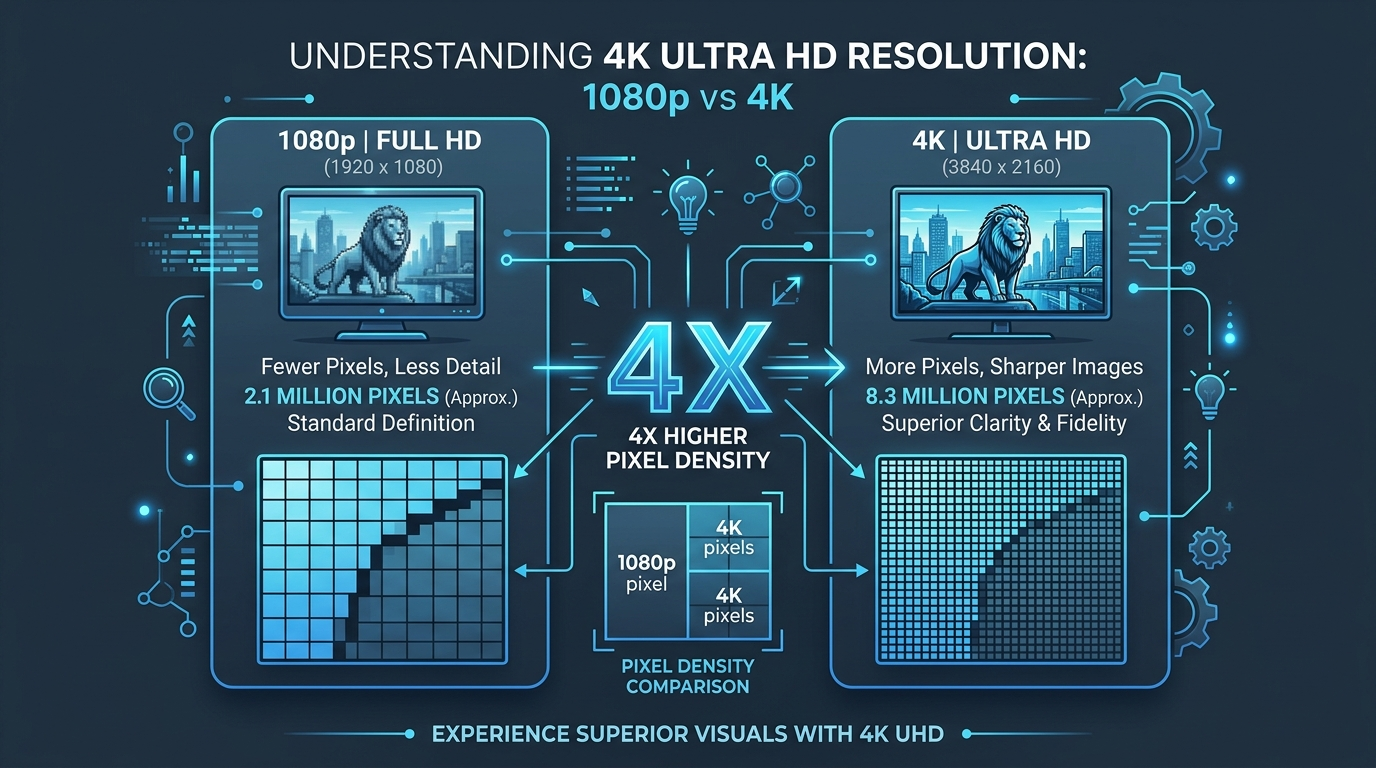
4K resolution refers to a display with 3840×2160 pixels, which adds up to roughly 8.3 million pixels on your screen. That's four times more detail than standard 1080p Full HD.
But — and this is important — there are actually two flavors of 4K:
UHD (Ultra High Definition): 3840×2160, used in your TVs, monitors, and gaming setups
DCI 4K: 4096×2160, the cinema industry standard used in professional filmmaking
You'll almost never run into DCI 4K unless you're in a movie theater or working in video production. For everyday life, UHD is what you want.
Why the Pixel Count Matters More Than You Think
More pixels means more pixel density, which is just a fancy way of saying your screen packs way more detail into the same amount of space. Think of it like upgrading from a cheap paintbrush to a fine-tip pen — suddenly you can draw the tiny details that used to just blur together.
4K vs 8K vs 1080p: A Side-by-Side Comparison
I get asked this constantly, so let's settle it with hard numbers instead of opinions.
Feature | 1080p Full HD | 4K UHD | 8K |
|---|---|---|---|
Resolution | 1920×1080 | 3840×2160 | 7680×4320 |
Total pixels | ~2.1 million | ~8.3 million | ~33.2 million |
Streaming bandwidth needed | 5–10 Mbps | ~25 Mbps | 50–100 Mbps |
Ideal screen size | Under 40" | 40"–75" | 75"+ |
Content availability | Widespread | Widespread | Limited |
Best for | Budget setups, small screens | TVs, gaming, streaming, monitors | Large-format cinema, pro editing |
My honest takeaway from this table: unless you own a screen larger than 75 inches and sit close to it, 8K gives you almost nothing extra you can actually see. According to research on angular resolution and viewing distance, you'd need to sit about 1.4 meters from a 55-inch screen just to notice 8K's benefit — closer than most living rooms allow.
If you're someone who works with video content regularly — say, editing raw footage before publishing — it's worth pairing your resolution upgrade with the right workflow tools. For instance, if you ever need to pull accurate captions or transcripts from your 4K video projects, our guide on AI video transcription walks you through it.
Is 4K Actually Worth It? (My Honest Take)
I know what you're thinking: "Sure, more pixels sound nice, but will I even notice the difference?"
Great question. Let's talk about it.
Here's the truth nobody tells you upfront — resolution differences aren't always visible. That means:
On a small phone screen held at arm's length? You probably can't tell 4K from 1080p.
On a 55-inch 4K TV in your living room? Huge difference.
Zooming into a photo, cropping a video, or reading detail in security footage? 4K wins, easily.
So here's my advice, and I mean this genuinely: if you're buying a 4K monitor or TV that's 50 inches or larger, or you sit close to your screen for work or gaming, this upgrade is worth every penny.
How to Choose the Right 4K Display: A Step-by-Step Guide
Alright, let's get practical. Here's exactly how I'd walk through this decision if I were shopping today.
Step 1: Figure Out Your Screen Size
Bigger screens benefit more from 4K's pixel density. Buying anything under 40 inches? You might not see a dramatic difference.
Step 2: Check for HDR Support
Don't just chase resolution — chase quality. HDR (High Dynamic Range) expands the range between the darkest blacks and brightest whites, and it honestly makes a bigger visual impact than resolution alone. Look for:
HDR10 or HDR10+
Dolby Vision
Step 3: Confirm Your Bandwidth Can Handle It
Check your internet speed before you commit. You'll want at least 25 Mbps for smooth 4K streaming without annoying buffering.
Step 4: Match It With the Right Hardware
If you're gaming, you'll need a solid GPU to push high frame rates at 4K. According to gaming monitor resolution comparisons, a GPU that hits 144fps at 1080p might drop to just 45fps at native 4K — so budget accordingly.
Step 5: Look for HDMI 2.1
Easy to overlook, but if you want 4K at high frame rates (like 120fps for gaming), you'll need HDMI 2.1 cables and a device that supports it.
Quick Checklist Before You Buy
Screen size is 40" or larger
HDR10, HDR10+, or Dolby Vision supported
Internet speed is 25 Mbps or higher
GPU can handle 4K frame rates (for gaming)
HDMI 2.1 ports available on your devices
And if you're building out a full home studio or workspace setup, upgrading your display is only half the equation — pairing it with reliable content tools matters too. If you ever record voice memos or webinars in 4K and need them written out, check out our free video transcription resource for a quick, no-cost way to convert your footage into text.
Frequently Asked Questions About 4K Resolution
Is 4K resolution worth it for gaming?
Yes, if your GPU can handle it. 4K gaming looks noticeably sharper than 1080p, but it demands significantly more graphics power — expect a real drop in frame rate compared to lower resolutions, so check your GPU's benchmarks first.
Does 4K streaming need faster internet?
Yes. You'll want roughly 25 Mbps for smooth 4K streaming. If you're considering 8K down the road, that jumps to 50–100 Mbps.
What's the difference between 4K and UHD?
Technically, "4K" and "UHD" get used interchangeably in consumer products, but true DCI 4K (4096×2160) is a cinema standard, while UHD (3840×2160) is what you'll find in TVs and monitors.
Should I buy 4K or wait for 8K to get cheaper?
Buy 4K now. Native 8K content is still scarce, most people can't perceive the difference at normal viewing distances, and 4K already delivers excellent, affordable image quality.
Do I need a special cable for 4K?
For standard 4K at 60fps, most HDMI 2.0 cables work fine. If you want 4K at 120fps (common in gaming), you'll need HDMI 2.1.
Why I'd Tell You to Buy 4K Today (Not Wait for 8K)
Here's my honest, no-fluff opinion.
Technology always tempts you to wait for "the next big thing." But right now, 4K sits in this perfect sweet spot — it's affordable, widely supported, and genuinely transforms how sharp and immersive your movies, games, and shows look.
8K is still years away from being practical for most households. The content isn't there. The bandwidth isn't there. And frankly, your eyes probably won't notice the difference anyway unless you own a massive screen.
So if you've been putting off upgrading your display resolution, this is your sign.
You don't need to overspend on 8K hype. You need a solid 4K TV or 4K monitor, paired with good HDR, and you'll get a viewing experience that feels genuinely next-level — without draining your wallet or your internet plan.
Trust me — once you switch to 4K, going back to 1080p will feel like putting on foggy glasses.
Make the smart choice. Go 4K.
Read Also: How to Voice Text on iPhone (2026 Guide)