You missed a call. Again. No greeting picked it up, and the caller just hung up. That gap is easy to close. To set up voicemail on Android, open your Phone app, press and hold 1 on the Keypad, then follow the prompts to set a voicemail PIN and record your greeting. The whole process takes about three minutes on any US carrier. This guide walks through every method, from the classic dial-in trick to Visual Voicemail, Google Voice, and the fixes for when things go wrong.
What You Need Before You Start
Before you set up voicemail on Android, make sure your SIM card is active and your phone shows a strong carrier signal. A weak signal can interrupt the setup call halfway through, leaving your voicemail box half-configured.
You'll also want your phone fully charged and free of call-blocking apps. These apps sometimes intercept the automated carrier voicemail line, so disable them temporarily if setup keeps failing.
How to Set Up Voicemail on Android by Calling In
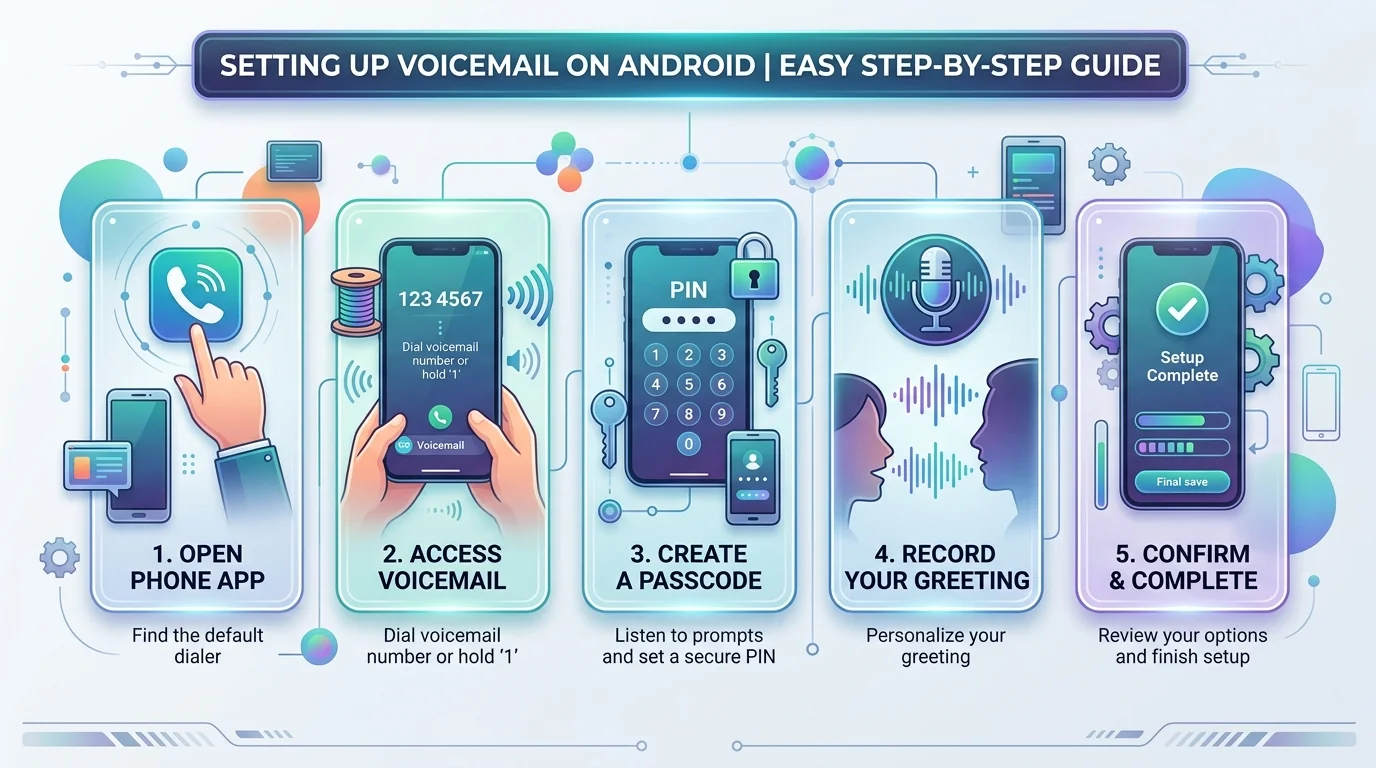
Every US carrier supports the same basic trick: dial into your own mailbox and let the automated system walk you through it. This works whether you own a Samsung Galaxy, a Google Pixel, or a budget Android phone with no fancy extras.
Open the Phone app.
Tap the Keypad tab at the bottom.
Press and hold 1, or dial the code *86, to reach your voicemail line.
Follow the voice prompts to create a voicemail password (usually 4-7 digits).
Record your greeting when asked, then confirm it.
Hang up. Your mailbox is now live.
Once this is done, missed calls automatically route to your new voicemail box, and you'll get a voicemail notification the next time someone leaves a message. If you'd rather read your messages than listen to them, check out our guide on how to transcribe audio on Android once your mailbox is active.
How to Set Up Visual Voicemail on Android
Visual Voicemail turns your voicemail app into something closer to email. Instead of dialing in and listening to messages in order, you see a list of senders and tap whichever one you want to hear first. Most carriers offer it free on phones running Android 6.0 or newer, though a few charge a small monthly add-on.
Setup differs slightly by phone brand, so here's how it works on the three most common devices in the US market. If you're weighing an Android phone against an iPhone, our iPhone transcription guide breaks down how voicemail handling compares between the two.
Google Pixel Visual Voicemail Setup
On a Google Pixel, open the Phone app, tap the menu icon, then go to Settings. Scroll to Voicemail and switch on the toggle. From this same screen you can change your greeting and adjust voicemail notification preferences without leaving the app.
Samsung Galaxy Visual Voicemail Setup
A Samsung Galaxy phone usually ships with a dedicated Visual Voicemail app already installed. Open it, tap Continue on the permissions screen, then tap Allow. Your messages should populate within a minute, sorted newest first, with playback controls built right into the list.
OnePlus / Other Android Visual Voicemail Setup
Phones from OnePlus, Motorola, and other manufacturers running close-to-stock Android phone settings follow a similar path: Phone app > Settings > Voicemail. The exact menu wording shifts depending on the manufacturer's software skin, so if you can't find it under Settings, check inside the Phone app's own menu instead.
How to Set Up Voicemail in Google Voice
Google Voice runs separately from your carrier voicemail, and plenty of people prefer it because it works from a phone, a tablet, or a browser. There's no manual activation step. The moment your Google Voice account is created, voicemail is already turned on.
To manage it, open the Voice app, tap Voicemail at the bottom, then hit the menu icon and choose Settings. From there you can record a fresh greeting, switch between saved greetings, and turn on voicemail transcription, which converts messages into readable text sent straight to your inbox. For a deeper look at how automated transcription works across different tools, our audio transcription guide covers the full process.
How to Record or Change Your Voicemail Greeting
Recording a greeting and changing one later use almost the same steps, so there's no need to treat them separately. Head into your Phone app, open Settings, then Voicemail, and choose whether to build a custom greeting or fall back on the default greeting.
If you already have a greeting saved and just want something fresher, the same menu lets you overwrite it in seconds. Record, listen back, and save. No need to call in from another line or wait for anything to process.
How to Set Up Voicemail by Carrier (Verizon, AT&T, T-Mobile)
The core steps stay similar everywhere, but the dial-in code and Visual Voicemail availability shift by provider. Here's a quick side-by-side look.
Carrier | Dial-In Code | Visual Voicemail | Extra Cost |
|---|---|---|---|
Verizon | 86 (VM) | Yes | Free |
AT&T | 123 | Yes | Free |
T-Mobile | 123 | Yes | Free |
Google Voice | N/A (app-based) | Built-in | Free |
If your phone was purchased through Verizon, note that Basic Voicemail and Visual Voicemail use two different activation paths, so check which one your account has before you start.
Common Voicemail Setup Problems and Fixes
Sometimes voicemail is not working, and it's rarely anything serious. Poor reception is the usual culprit, so a quick toggle of airplane mode often clears it. A full voicemail box is another frequent cause; delete old messages and the notifications should start flowing again.
Forgot your voicemail password? A voicemail password reset typically requires contacting your carrier directly, since you can't bypass it from the phone alone. If you deleted a message by accident, some carriers offer a short grace period to retrieve deleted voicemail before it's gone for good, so check your carrier's app first before assuming it's unrecoverable. Once you've recovered a message worth keeping, a free audio to text converter can turn it into a written record with no signup needed.
How to Turn Off or Delete Voicemail on Android
To disable voicemail, dial your carrier's deactivation code, usually reachable through the same voicemail menu used for setup, and select the option to turn the service off. This stops call forwarding to voicemail entirely, so unanswered calls will simply ring out instead.
Deleting old messages is separate from disabling the service. Open the voicemail list, select a message, and tap delete. Some phones also let you save a message as an audio file before removing it from the mailbox. If you regularly forward voice notes between apps, our guide on the voice message to text converter shows how to keep a written copy before deleting the original.
Frequently Asked Questions
Why isn't my voicemail working on my Android phone? Weak signal, a full mailbox, or an accidentally disabled setting are the three most common reasons. Restarting your phone and checking your Android phone settings under Voicemail usually resolves it quickly.
How do I check voicemail from another phone? Dial your own number, and when the greeting starts, press the star key or another key specified by your carrier, then enter your PIN to hear your messages remotely.
How do I reset my voicemail password? Contact your carrier's support line directly. Most carriers can't process a voicemail password reset through the automated system alone, since it requires identity verification.
Can I use Google Voice instead of carrier voicemail? Yes. A Google Voice account offers its own independent mailbox with voicemail transcription and email notifications, and it works even without an active cell plan on that device.
Does Visual Voicemail cost extra? Most major US carriers, including Verizon, AT&T, and T-Mobile, include Visual Voicemail for free on modern smartphones. A small number of older plans still charge a monthly fee, so it's worth confirming with your provider.
How do I reset my voicemail on my Android? Go to Phone app > Settings > Voicemail > Change PIN, or call your carrier if you've forgotten the password entirely.
How to activate voicemail? Press and hold 1 on the Keypad, or dial *86, then follow the automated prompts to activate your mailbox.
How do I set my voicemail on my Samsung? Open the Visual Voicemail app, tap Continue, then Allow, and your Samsung Galaxy mailbox activates automatically.
Where is the voicemail button on an Android phone? It sits inside the Phone app's Keypad tab, typically accessed by pressing and holding the number 1.
Conclusion
Setting up voicemail on Android takes only a few minutes, whether you dial in the classic way or activate Visual Voicemail through your phone's settings. Pick the method that matches your phone brand, record a greeting that sounds like you, and you'll never miss another message again.
Read more: How to Set Up Voicemail on iPhone: 2026 Guide
![Recover Gmail Password Without Phone Number [2026]](https://contiocdn.com/efdc9a99-5ac4-4f75-be3a-ed43de859d76/blog-covers/1790082232767-y9rtx1hq-recover-gmail-password-without-phone-number--2026-.webp)