An online audio transcriber converts spoken audio into written text using AI-powered speech recognition. Instead of typing out interviews, lectures, or meetings by hand, you upload a file and let automatic transcription handle the rest. Most tools return a finished transcript within minutes, complete with speaker recognition and support for dozens of languages. This matters because manual transcription can take four to five times longer than the audio itself, while AI transcription tools now reach accuracy levels close to human transcribers. Whether you are a student, journalist, podcaster, or business professional, an online audio transcriber turns hours of listening into a searchable, editable document you can use right away.
For more transcription guides and tool comparisons, visit the AudioToTextify blog.
How to Transcribe Audio to Text
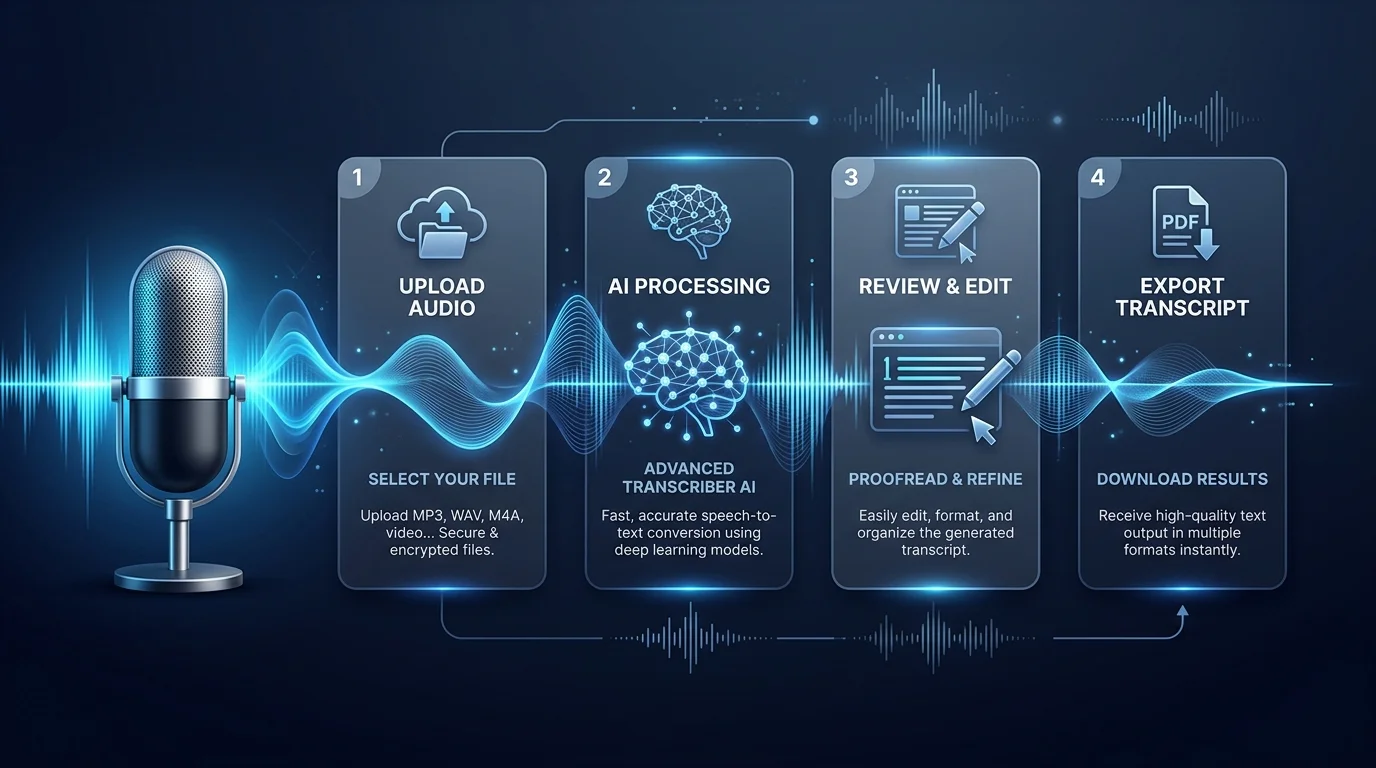
Converting audio to text takes three steps: upload, transcribe, export. That's the whole process. No software to install. No manual typing. You paste a file or a link, the AI does the heavy lifting, and your text shows up ready to edit.
Most first-time users worry it'll be complicated. It isn't. Think of it like sending an email attachment — except instead of a reply, you get a full transcript. The entire cycle for a one-hour recording usually finishes in under two minutes.
Upload or Drag & Drop Your File
Drag your file into the upload box, or click to browse your computer. You can also upload audio file links straight from cloud storage or paste a video URL. There's no need to convert formats first — the tool handles that automatically behind the scenes.
Let AI Transcribe Your Audio
Once uploaded, the AI gets to work. It uses automatic transcription models trained to recognize speech patterns, accents, and background noise. Processing a typical file takes seconds to a couple of minutes, depending on length and audio clarity.
Download, Export, or Share Your Transcript
When transcription finishes, you can download transcript files instantly or share a private link. Export in whichever format suits your workflow, whether that's a plain text file or a formatted document ready for editing.
Why Choose Our Audio Transcriber
Not every transcription software performs the same. Accuracy, speed, and privacy separate the good tools from the forgettable ones. TranscribeAI was built around all three, so you're not stuck fixing errors line by line afterward.
Beyond raw transcription, you get built-in extras most competitors charge separately for. Speaker labeling, translation, and summaries come standard. That combination is what makes people stick around after their first free file.
Fast, Accurate AI Transcription
Speed matters, but accuracy matters more. TranscribeAI aims for 99% accuracy on clear audio, meaning fewer corrections and less time spent proofreading. A one-hour interview typically transcribes in under two minutes flat.
Supports 50+ Languages & Accents
Whether your speaker has a British accent or speaks Portuguese, the tool adjusts. Built-in accent detection means you don't need to manually flag which dialect you're using — it figures that out on its own. Read our full breakdown in Spanish Audio to Text.
Speaker Recognition & Diarization
Diarization sounds technical, but it's simple: the AI tells you who said what. In a group interview or meeting recording, each speaker gets labeled automatically, so you're not guessing who "Speaker 2" is later.
Works with All Major Audio & Video Formats
You don't need a converter app first. The tool reads popular audio and video formats directly, extracting spoken content even from video files without a separate step.
Secure & Confidential (GDPR/SOC 2 Compliant)
Privacy isn't an afterthought here. Files are encrypted in transit and at rest, and the platform follows GDPR compliant and SOC 2 compliant practices, so sensitive interviews or client calls stay confidential.
Supported File Formats
Flexibility on file types saves you a conversion step every single time. Whether you recorded on your phone, a podcast mic, or a video camera, the file usually just works without extra fuss.
Large files aren't a problem either. Most plans support files up to several hours long and several gigabytes in size, so a full lecture or a long-form podcast episode won't get rejected halfway through upload.
Format Type | Supported Extensions |
|---|---|
Audio | MP3, WAV, M4A, AAC, FLAC, WMA, OGG |
Video | MP4, MOV, AVI, MKV |
Audio Formats (MP3, WAV, M4A, etc.)
MP3 and WAV conversions are the most common requests, and both are supported natively. Check out our dedicated guides on how to convert MP3 to text and how to convert WAV to text for format-specific tips.
Video Formats (MP4, MOV, etc.)
MP4 to text conversion pulls the audio track straight out of your video file. This is handy for YouTube creators, webinar hosts, or anyone recording on a phone camera instead of a standalone microphone. See our guide on free video transcription online for a full walkthrough.
Export Your Transcript in Any Format
A transcript is only useful if it fits into your existing workflow. That's why export options cover writers, editors, video creators, and data analysts alike, not just one type of user.
You're not locked into one file type either. Switch formats after transcription without starting over, and use the online editor to clean up names, punctuation, or timestamps before exporting.
Export Format | Best For |
|---|---|
TXT | Quick notes, plain text editing |
DOCX | Reports, Word-based collaboration |
SRT | YouTube captions, video subtitles |
XLSX | Timestamped data, spreadsheet analysis |
TXT
TXT format is the simplest option. No formatting, no fuss — just the raw words. Great for pasting into a blog draft or a research notebook.
DOCX
DOCX export keeps formatting intact for Word or Google Docs. This is the go-to choice for reports, transcripts sent to clients, or anything needing collaborative editing.
SRT / Subtitles
SRT subtitles are timestamped and formatted for direct upload to YouTube or video editing software. This is essential for subtitle generation and accessibility compliance.
XLSX
Spreadsheet export works well for researchers coding qualitative data or teams tracking who spoke when, down to the exact second.
More Than Transcription — AI Summary, Key Points & Mind Maps
A transcript alone doesn't always save time if you still have to read the whole thing. That's where AI summary tools come in, condensing a 60-minute recording into a few readable paragraphs.
Mind map generation turns spoken ideas into a visual structure, which is especially useful for lectures or brainstorming sessions. Add key points extraction, and you've got a fast way to review a meeting without replaying the audio at all.
Supported Languages
Language coverage decides whether a tool works for global teams or just one market. TranscribeAI supports a wide language list, with strong performance across major European and Asian languages.
Accents and regional dialects are handled automatically, so a Spanish speaker from Madrid and one from Mexico City both get accurate results without switching settings manually.
English, Spanish, French, German, Italian, Portuguese, Dutch, Polish, and more
Core supported languages include English, Spanish, French, German, Italian, Portuguese, Dutch, and Polish, alongside growing support for Hindi, Japanese, Korean, and Turkish. New languages get added as demand grows.
Who Uses Our Audio Transcriber
People from very different fields rely on the same basic tool for very different reasons. A journalist chasing a deadline and a student reviewing lecture notes both need the same thing: accurate text, fast.
That range of use cases is exactly why an online audio transcriber has become a staple tool rather than a niche product. It fits into almost any workflow that involves spoken content.
Journalists & Media
Interview transcription turns raw recordings into quotable text within minutes, which matters when you're racing a publishing deadline.
Students & Researchers
Lecture transcription and research transcription convert seminars and focus groups into searchable notes. See our guide on AI transcription for students for study-specific tips.
Podcasters & Content Creators
Podcast transcription generates show notes and captions automatically. Our guide to the best AI transcription tool for podcasters covers this in more depth.
Business & Meeting Teams
Meeting notes get captured automatically, so nobody has to type while trying to listen and contribute at the same time.
UX & Customer Research Teams
User interviews and usability sessions turn into searchable documentation, making it easier to spot patterns across dozens of sessions.
Pricing Plans
Pricing should scale with how much you actually transcribe. A student uploading one lecture a week needs a very different plan than an agency processing hundreds of client interviews monthly.
TranscribeAI offers four tiers, moving from a free trial with no credit card required up to a high-volume plan built for teams. Add-on minutes are available if you go over your monthly limit.
Plan | Monthly Minutes | Best For |
|---|---|---|
Free | 60 | Trying the tool, one-off files |
Basic | 600 | Regular individual use |
Standard/Premium | 1,500 | Growing teams, frequent uploads |
Pro | 3,000+ | Agencies, API access, bulk transcription |
Free
No card required, limited monthly minutes, ideal for testing accuracy before committing to a paid plan.
Basic
Suited to freelancers and students who transcribe a few files weekly, with full export format access included.
Standard/Premium
Built for small teams needing more monthly minutes, faster processing, and priority support.
Pro
Designed for agencies and high-volume users, including API access and bulk file processing.
What Our Users Say
Trust signals matter when someone's deciding whether to upload a private client call or a research interview. Real feedback, not polished marketing copy, tends to answer that concern best.
Users consistently mention two things: how little cleanup the transcript needs, and how fast the turnaround is compared to typing manually. One podcaster noted that a 45-minute episode was ready before their coffee finished brewing — a small detail, but it stuck with them enough to mention in a review.
Frequently Asked Questions
Is it free to use?
Yes. A free trial with no credit card is available, giving you a set number of transcription minutes each month before you need to upgrade.
How accurate is the transcription?
Accuracy reaches up to 99% accuracy on clear audio with minimal background noise. Heavy accents or poor recordings may need light manual editing afterward.
Which languages and formats are supported?
Over 50 languages are supported, along with major audio formats like MP3 and WAV, plus video formats like MP4. Full lists are available on the pricing page.
How fast is the transcription process?
Most files finish in under two minutes per hour of audio, though exact speed depends on file size and server load at upload time.
Is my data secure?
Yes. Files are encrypted, and the platform follows GDPR compliant and SOC 2 compliant data handling standards throughout.
Can I transcribe video files too?
Yes. Upload any supported video format, and the tool automatically extracts and transcribes the spoken audio track.
How does billing/refunds work?
Subscriptions renew monthly or annually depending on your choice. A refund policy applies within the first few days of a paid plan if you're not satisfied.
Related Guides & Tools
If you're new to transcription workflows, a few related guides can help round out your setup. These cover common follow-up tasks people search for right after transcribing their first file.
Exploring these resources helps you get more from your transcripts, whether that's converting YouTube videos or comparing other tools on the market.
YouTube to Transcript
Turn any YouTube video into a full transcript in a few clicks. Read the full guide: YouTube to Transcript.
Best Free Transcription Software Online
A comparison roundup covering accuracy, pricing, and language support across the top free tools available this year. Read more: Best Free Transcription Software Online.
AudioToTextify vs Otter.ai
A side-by-side look at how TranscribeAI stacks up against Otter.ai on accuracy, pricing, and features. Read the comparison: AudioToTextify vs Otter.ai.
Conclusion
An online audio transcriber turns hours of manual typing into a two-minute upload. Whether you're a journalist on deadline, a student reviewing lectures, or a team documenting meetings, the process stays the same: upload, transcribe, export. Try TranscribeAI's free plan today and see how much time a clean transcript actually saves you. Browse more guides on the AudioToTextify blog.
Read more: Best Free Transcription Software Online 2026 Guide